Agentic AI describes systems that can pursue a goal through several steps, using tools and the information returned by those tools to decide what to do next. An AI agent is a component that performs work within a defined set of instructions and permissions. A configured workflow defines the steps and rules of a repeatable process.
These labels overlap across products. A useful evaluation asks what the system can actually read, which actions it can take and how a person checks the result. A fluent answer or a diagram of several agents does not establish those capabilities.
This guide uses a financial-document case to explain the choices. For a general introduction, start with what AI agents are. Here the focus is how much flexibility the process needs, and where fixed checks belong.
Agentic AI, AI agents and workflows
There is no single industry boundary between the terms. Google Cloud describes agentic AI as a broader approach involving goal-directed systems and agents. Anthropic distinguishes predefined workflows from agents that direct their process and tool use dynamically. Both perspectives help clarify what a product is doing; neither label guarantees a particular level of autonomy.
| Approach | What determines the next step? | Document example |
|---|---|---|
| Configured workflow | Defined actions, conditions and checks | Extract invoice lines, compare quantities and route discrepancies |
| Specialist AI agent | Instructions, available tools and their results | Inspect a case and explain the statement analysis |
| Coordinated agentic process | A goal, permitted actions and feedback across steps | Organise checks, identify missing evidence and assemble a case summary |
The same application can use all three. A calculation should remain a calculation even when an agent requests it. The agent's explanation should point to the computed result and its source, rather than invent another answer.
A worked example: reviewing a credit application
Imagine an application containing a company licence, bank statements and a set of invoices. The operations team needs to understand the documents, review cash flow and identify inconsistencies before applying its credit policy.
First establish the case boundary: which applicant, accounts and period the files describe. A missing statement month is an input problem. Giving the system more freedom to choose tools does not supply that missing month.
Next run the relevant checks. Statement analysis extracts and classifies transactions. Document-fraud checks look for available integrity signals. A configured document workflow can compare fields or reference records. These tools answer different questions, so their findings should remain distinguishable.
Finally assemble the evidence for review. The reviewer needs the original figure, its source and the reason for any exception. The system should preserve a failed or incomplete check even if other checks pass.
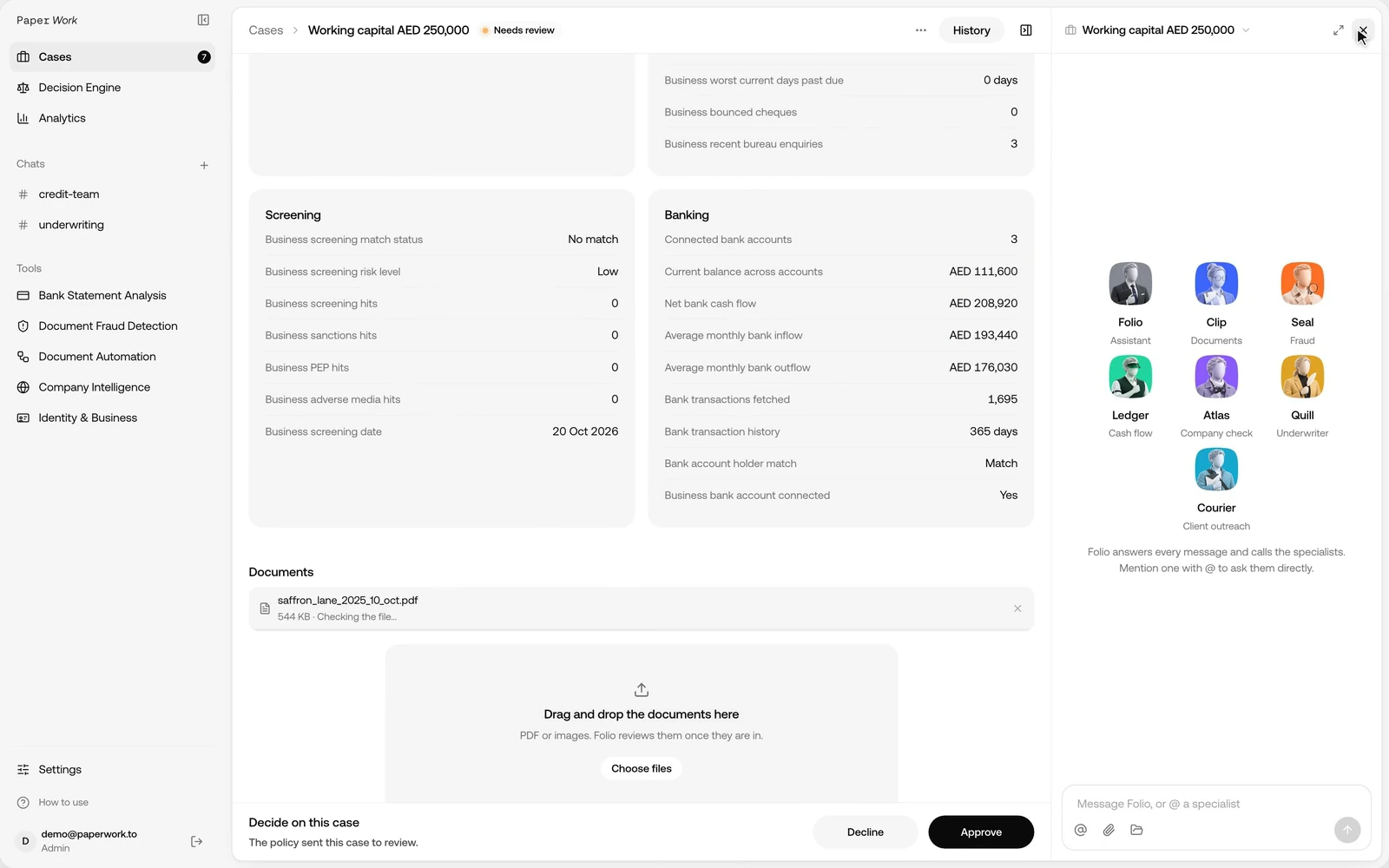
In Paper OS, Folio coordinates the case, Seal uses Fraud Detection, Ledger uses BSA and Clip runs configured DA workflows. The recording shows that product workflow on sample documents, rather than a claim that any arbitrary business process is already automated.
Read the recorded case: four different outputs
The Paper OS recording makes the distinction concrete. The sample application requests AED 250,000 of working capital over 180 days. The application data includes a reported monthly revenue of AED 186,000 and four open credit facilities. Those are case inputs, not conclusions the agent has independently proved.
The screen also has a Recommendation, an Agent review and a conversation. Reading these as one undifferentiated AI answer would lose important information.
| Layer in the case | What it contributes | What the reviewer opens next |
|---|---|---|
| Application data | The supplied request and business information | The source and date of each supplied figure |
| Tool findings | Results from statement and document checks | The original finding and supporting document |
| Recommendation | The outcome of the configured decision rules | Why this result? and the rule that matched |
| Agent review and chat | An explanation of the evidence available to the agent | The stated gaps, tool failures and follow-up questions |
In the recorded example, the policy recommendation is Decline while the agent review says Needs information. The conversation discusses a fraud finding and a failed statement analysis. These labels describe different parts of the process. Before relying on an explanation, check which results it used and whether new evidence arrived after that review.
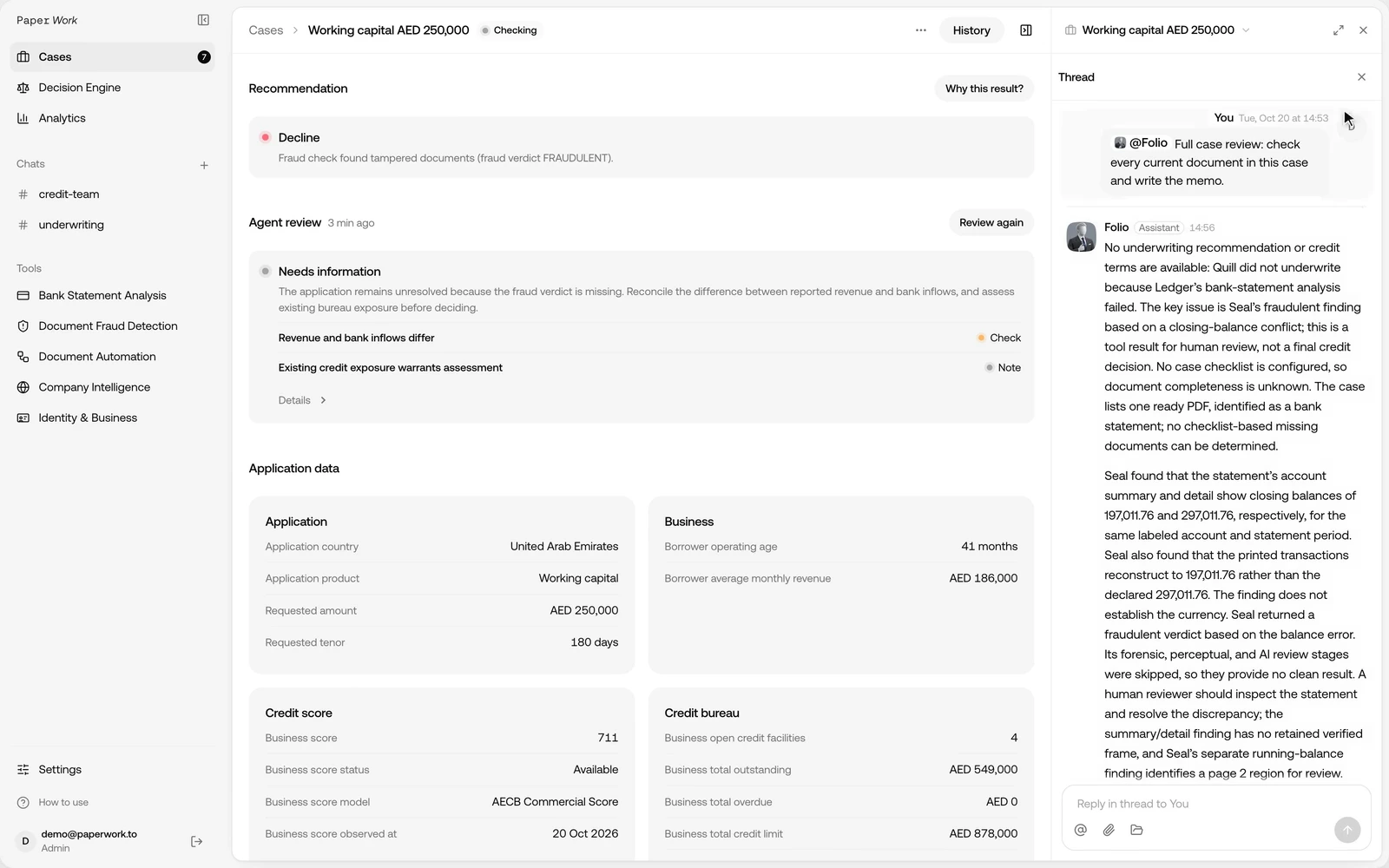
This is where a case workspace is more useful than copying a PDF into an isolated chat. The reviewer can keep the application, the tool findings, the explanation and the action history together. A later question can refer to the same case rather than starting again with an unlabelled pile of files.
For example, a useful follow-up is “Which source supports the reported revenue, and which bank figure did you compare it with?” It asks for a traceable comparison. “Tell me this is a good customer” supplies no acceptance rule and can obscure the evidence the team needs.
What an agent needs between the question and the answer
An agentic document process has several practical ingredients. They matter more than the number of agent avatars in the interface.
A clear task. “Review the current case documents and summarise unresolved findings” is a bounded request. “Manage credit risk” does not identify the files, scope or result. Define when the task is complete and what the agent should return when it cannot complete it.
The right context. The application, account period and uploaded files establish what is being reviewed. Known company accounts and related entities may come from a separate company profile. Document text alone does not establish every business relationship.
Tools with defined outputs. Fraud Detection returns document-integrity findings. BSA returns statement analysis. DA returns the configured document checks. Keep these results available for inspection rather than reducing everything to a paragraph of prose.
State across steps. A process needs to know which files have been checked, which results are current and which question remains open. Re-running a check after a replacement document should not silently make an older explanation the final record.
An action boundary. Explaining a recommendation, drafting an email, sending that email and confirming a decision are different actions. Assign the appropriate permission and review step to each. In the recording, Courier prepares a request for an original statement and the email remains a draft for the team to review.
A stopping condition. An unsupported layout, missing file or unresolved conflict needs a defined result. The next step might be requesting another document or sending the case to an analyst. A long sequence of tool calls is not evidence that the process succeeded.
A tool-level example: why the supporting rows matter
Consider a separate sample BSA run for Cedarline Office Supplies. The account receives AED 1,659,680.10 over six months. That incoming total includes AED 450,000 from a sister company, a loan disbursement of AED 200,000 and AED 115,000 transferred from the company's own account. After those classifications, the reported net business credits are AED 894,680.10.
An agent answering “What is the business revenue?” needs to retain that distinction. Repeating the total incoming amount would give the reviewer a very different picture. The helpful answer explains the classification and points to the movements supporting it.
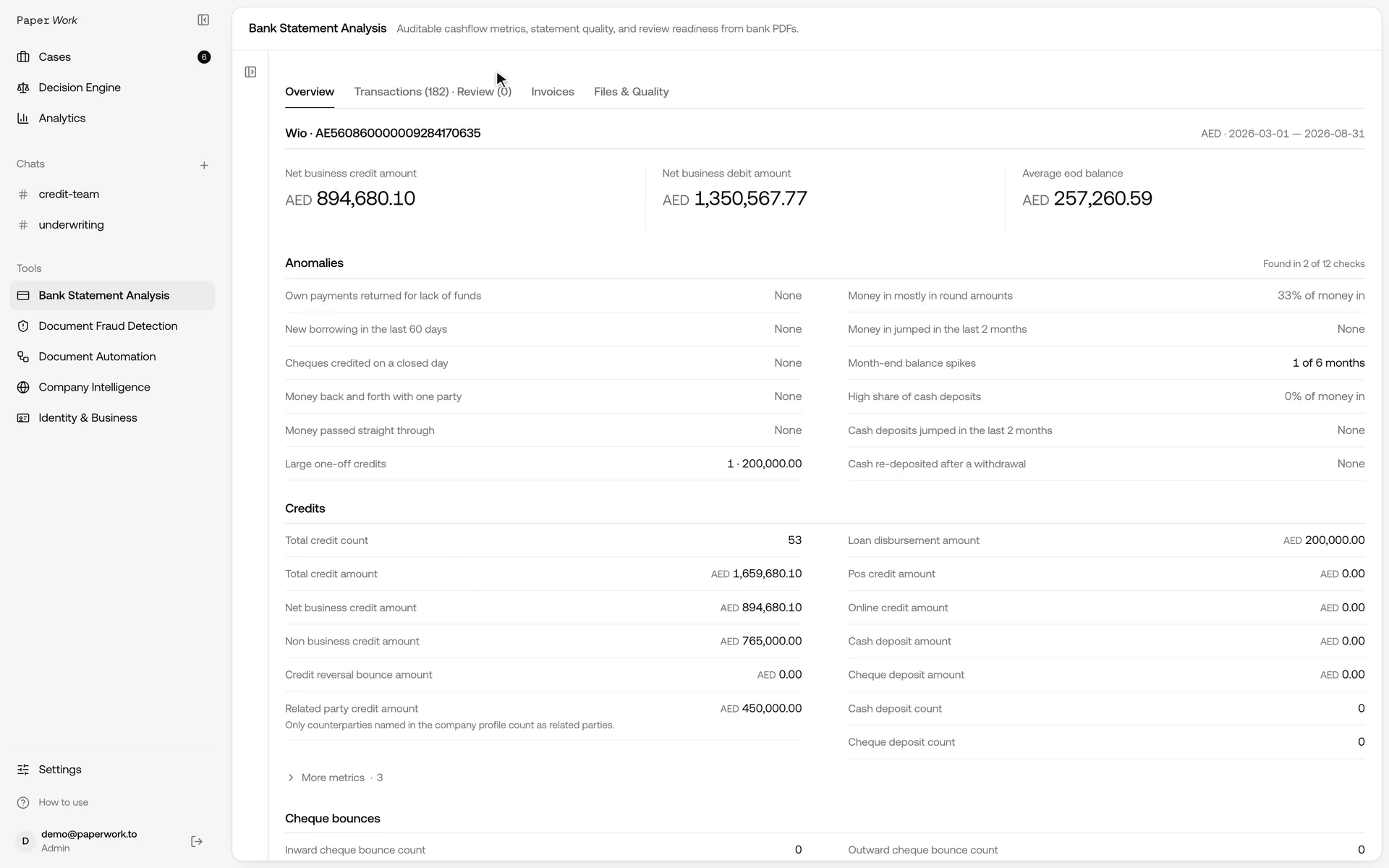
The short recording below opens the calculations in BSA. It shows the sort of underlying result that an explanation should rely on: the metric definition, the monthly breakdown and the transactions included or excluded.
The company profile supplies the known relationships in this example. If the customer has not supplied an own account or related company, the evaluation needs to account for that missing context. The agent's role is to explain what the available data supports, not to invent an organisational chart from a counterparty name.
Keep the policy distinct from the explanation
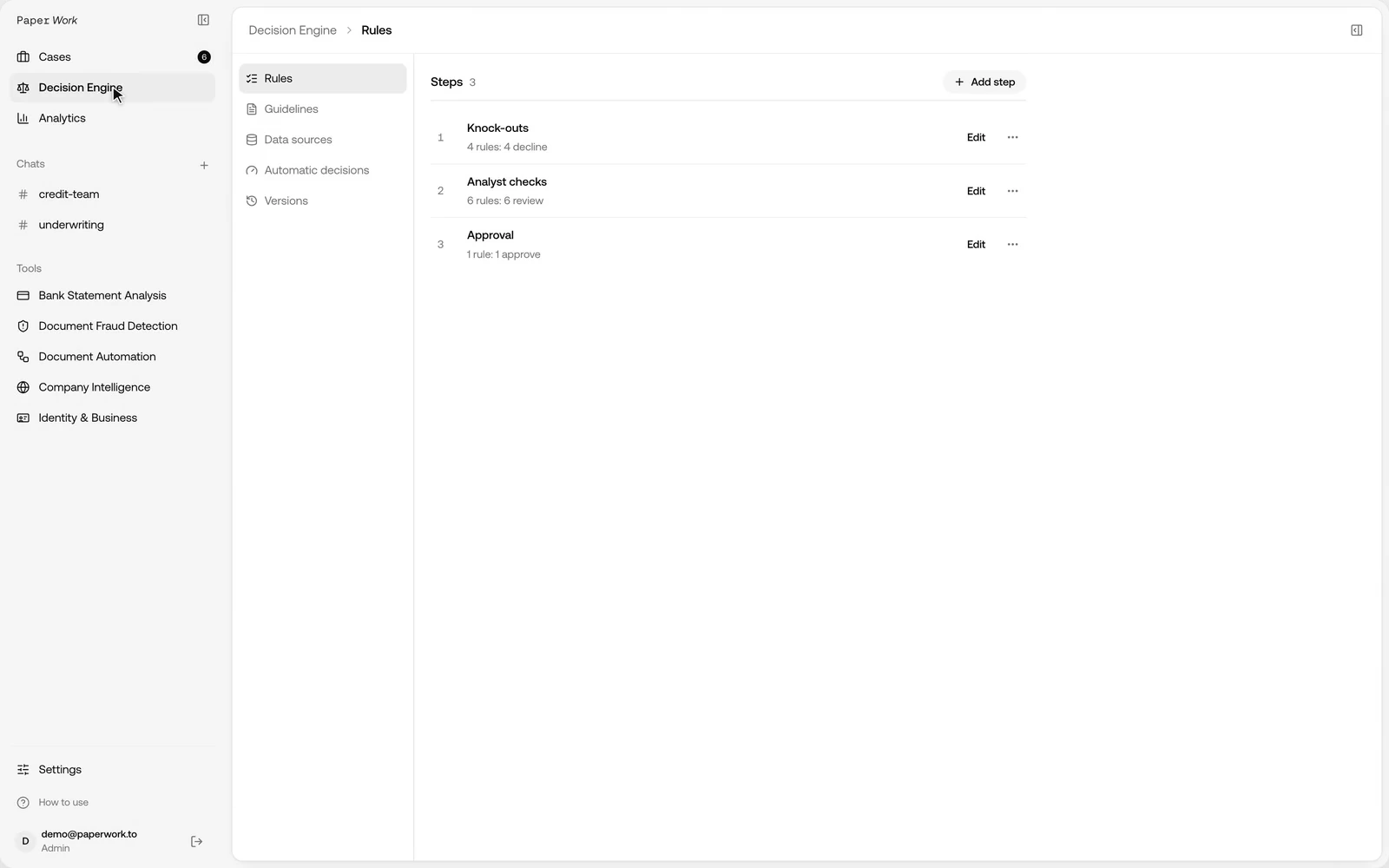
The Decision Engine in the recording contains ordered rules, including knock-outs. This is a different control from asking an agent to write a credit memo. A policy rule can act on a tool result; the memo explains the available evidence and any gaps.
Before a pilot, describe a few cases in ordinary business terms. One has complete, consistent evidence and follows the normal route. Another lacks a required statement month. A third has a known document discrepancy. For each, write the expected tool results, recommendation and review action independently of the agent's response.
Then inspect disagreements. Did extraction fail, did the matching policy need another rule, did the agent use an old result, or did the recommendation apply a different income basis? These are different fixes. Changing the agent's wording will not repair a failed parser or an incomplete reference record.
Where automatic decisions are enabled, confirm the permitted actions and operational limits separately from the quality of the explanation. An agent that writes a useful summary has demonstrated one capability; it has not demonstrated that the team should delegate every consequential action to it.
When a fixed document workflow is the better starting point
A repeatable task with clear inputs and acceptance rules usually benefits from an explicit workflow. An accounts-payable check might always need the invoice, the order reference, agreed line keys and a policy for differences.
Use Document Automation to define the fields and checks for that task. Decide what happens when a required file is absent, when two lines share an item code and when the evidence cannot support a comparison.
Adding an agent can make that workflow easier to invoke or explain. It should not turn a failed quantity check into a pass because the user asks persuasively. A configured result and an agent's narrative have different jobs.
When an agent adds useful flexibility
An agent is useful when the next question depends on the evidence. A reviewer might ask why a business-credit figure changed, which transfers were excluded or which document is missing from a case.
The agent needs access to the relevant results and supported tools. Permission to explain a finding does not imply permission to edit a policy, approve a payment or send a client email. Define those boundaries for each action.
For Paper OS, a customer can supply instructions and selected tools. For a new invoice, receiving or reconciliation process, the required DA scenario still has to be configured and tested. A new agent name is not a substitute for that implementation.
What to test before giving a process more autonomy
| Test | What a reviewer should be able to inspect |
|---|---|
| A correct case | The result agrees with an independently prepared answer |
| A missing document | The process identifies the gap instead of filling it in |
| A tool failure | The failure remains visible and the case follows the agreed review route |
| Ambiguous evidence | The alternatives and unresolved question are retained |
| Repeated instructions | The same evidence is not counted twice |
| An unauthorised action request | The action remains outside the agent's permissions |
Test ordinary cases as well as exceptions. Measure false matches and incorrect conclusions alongside completion rate. A process that finishes every case by guessing is not a successful automation.
Agentic document processes for MENA teams
For operations in the UAE, Saudi Arabia, Qatar or Oman, use the actual languages, statement layouts, supplier records and credit rules the team handles. Country names in a prompt do not establish bank support or local policy coverage.
Start with a bounded pilot: representative files, an expected result and the actions the system may perform. Confirm the exact formats and review process. Expand only after the team can inspect the evidence and reproduce the outcome.
Frequently asked questions
Does agentic AI always require several agents?
No. Terminology varies. Evaluate the tools, control flow and permissions, rather than using the number of agents as a quality measure.
Is a chatbot with document upload an agentic system?
Document upload alone does not establish tool use, action permissions or a reviewable workflow. Ask which operations the product actually supports.
Can an agent perform bank reconciliation?
It can invoke and explain a supported process. Invoice-to-payment matching in BSA and a full statement-to-ledger reconciliation are different scopes. A new DA reconciliation scenario needs its own inputs, matching policy and acceptance tests.
Where should we start?
Use Paper OS for agent work inside client cases, or DA for a document process configured around specific fields and rules.