Bank reconciliation compares a bank statement with a business’s own accounting records. The aim is to explain differences, identify missing or incorrect entries and retain a record of what has been matched.
A statement that adds up internally can still disagree with the ledger. A payment may not have cleared, a fee may be missing from the books, or the same entry may have been recorded twice. Those are separate questions from whether the PDF itself was changed.
This guide walks through a bank reconciliation statement (BRS) example, the exceptions that break automated matching, and how Paperwork matches invoices to the payments on a bank statement.
What is bank reconciliation?
The two sides describe the same account from different records. The bank statement lists transactions posted by the bank. The cashbook or ledger records the business’s entries. Reconciliation compares them for a defined account, currency and period.
Start with a complete export on both sides. A missing page or an incomplete ledger extract can create an apparent difference that no matching rule can resolve.
Tally’s documentation describes statement-to-book matching and separates transactions found only in the bank from those found only in the books. That is a useful distinction when designing a review result. Bank reconciliation in TallyPrime.
Bank reconciliation versus bank statement analysis
| Task | Question | Typical result |
|---|---|---|
| Statement parsing and balance checks | Were the statement’s transactions read consistently? | Extracted rows and balance continuity checks |
| Bank statement analysis | What do the transactions show about income, cash flow and obligations? | Monthly metrics and supporting transactions |
| Bank reconciliation | Do bank transactions agree with the accounting records? | Matched entries, differences and outstanding items |
| Document fraud detection | Are there signs the document was altered? | Integrity findings and available evidence |
Paperwork BSA reads the statement and reconciles invoices against its payments. A full ledger reconciliation also needs the accounting export and its own matching policy. Fraud Detection can check the document alongside that work.
Bank reconciliation statement (BRS) format and example
A bank reconciliation statement, often shortened to BRS, is the working that explains why the bank balance and the cashbook balance differ on a given date. The usual BRS format starts from one closing balance, adds or deducts each reconciling item, and arrives at the same adjusted balance from both sides.
Consider one account in AED. Both records start at AED 10,000. The entries below are invented to demonstrate the accounting process.
| Movement | Cashbook | Bank statement |
|---|---|---|
| Opening balance | 10,000 | 10,000 |
| Customer receipt | +3,000 | +3,000 |
| Supplier payment cleared | −1,000 | −1,000 |
| Supplier payment not yet cleared | −500 | — |
| Deposit not yet posted by the bank | +200 | — |
| Bank fee not entered in the books | — | −50 |
| Closing balance | 11,700 | 11,950 |
The closing balances differ by AED 250, but a single adjustment of AED 250 would hide the actual items.
Start with the bank closing balance of AED 11,950. Add the AED 200 deposit in transit and deduct the AED 500 outstanding payment. The adjusted figure is AED 11,650.
Start with the cashbook closing balance of AED 11,700. Record the missing AED 50 bank fee. The adjusted figure is also AED 11,650.
The timing items remain documented until they clear. The fee needs an accounting entry under the business’s process. Agreeing adjusted balances does not remove the need to retain the underlying items and evidence.
How to reconcile a bank statement step by step
1. Confirm the scope
Identify the account, currency, opening position and period. Keep different accounts and currencies separate unless the process explicitly defines their treatment.
2. Check the inputs
Confirm the statement is complete and the accounting export covers the same scope. Preserve original transaction identifiers and source references.
3. Normalise comparable values
Agree how debit and credit signs work, which date is compared and how amounts and currencies are represented. A posting date and an accounting date can describe different stages of the same transaction.
4. Find supported matches
Use the agreed identifiers and rules. An identical amount alone can create a false match when a business makes several payments of the same size.
5. Review unmatched and ambiguous entries
Separate entries only in the bank, only in the books and those with more than one plausible partner. Do not silently choose one candidate to make the totals agree.
6. Explain the closing difference
Record outstanding items and the adjustments that belong in the books. Each explanation should point to the original entry and have an owner where follow-up is required.
Exceptions an automated process must preserve
| Exception | Why it matters | Useful handling |
|---|---|---|
| Same amount paid twice | Amount matching can pair the wrong rows | Retain identifiers and flag ambiguous candidates |
| Different dates | Recording and posting happen at different times | Use an agreed date policy and keep both dates |
| Bank charges | An entry can exist only on the statement | Show it separately for accounting review |
| Partial or combined payments | One row may relate to several entries | Configure allocation rules; do not assume 1:1 |
| Missing or unreadable data | A match cannot be established | Return incomplete evidence for review |
| Duplicate source rows | Reimports can inflate matched totals | Detect repeats without discarding legitimate repeated payments |
A matcher should also prevent a row being consumed twice. Otherwise the output can look complete while two ledger entries rely on one bank transaction.
Matching invoices to bank payments with BSA
Most of the daily work in reconciliation is answering one question per invoice: has it been paid, and by which bank transaction? Bank Statement Analysis does this as part of the statement analysis.
Upload the statement together with sales and purchase invoices or credit notes. BSA reads each invoice and looks for its payment among the statement transactions:
- a payment is linked when the invoice number or the counterparty name appears in the bank narration, in the same currency and direction;
- an invoice can be settled by several payments, and the remaining balance due is shown;
- invoices with no payment are listed with their aging, so overdue receivables are visible;
- a re-uploaded copy of the same invoice is marked as a duplicate instead of being matched twice;
- an invoice where subtotal plus VAT does not equal the total is flagged for review.
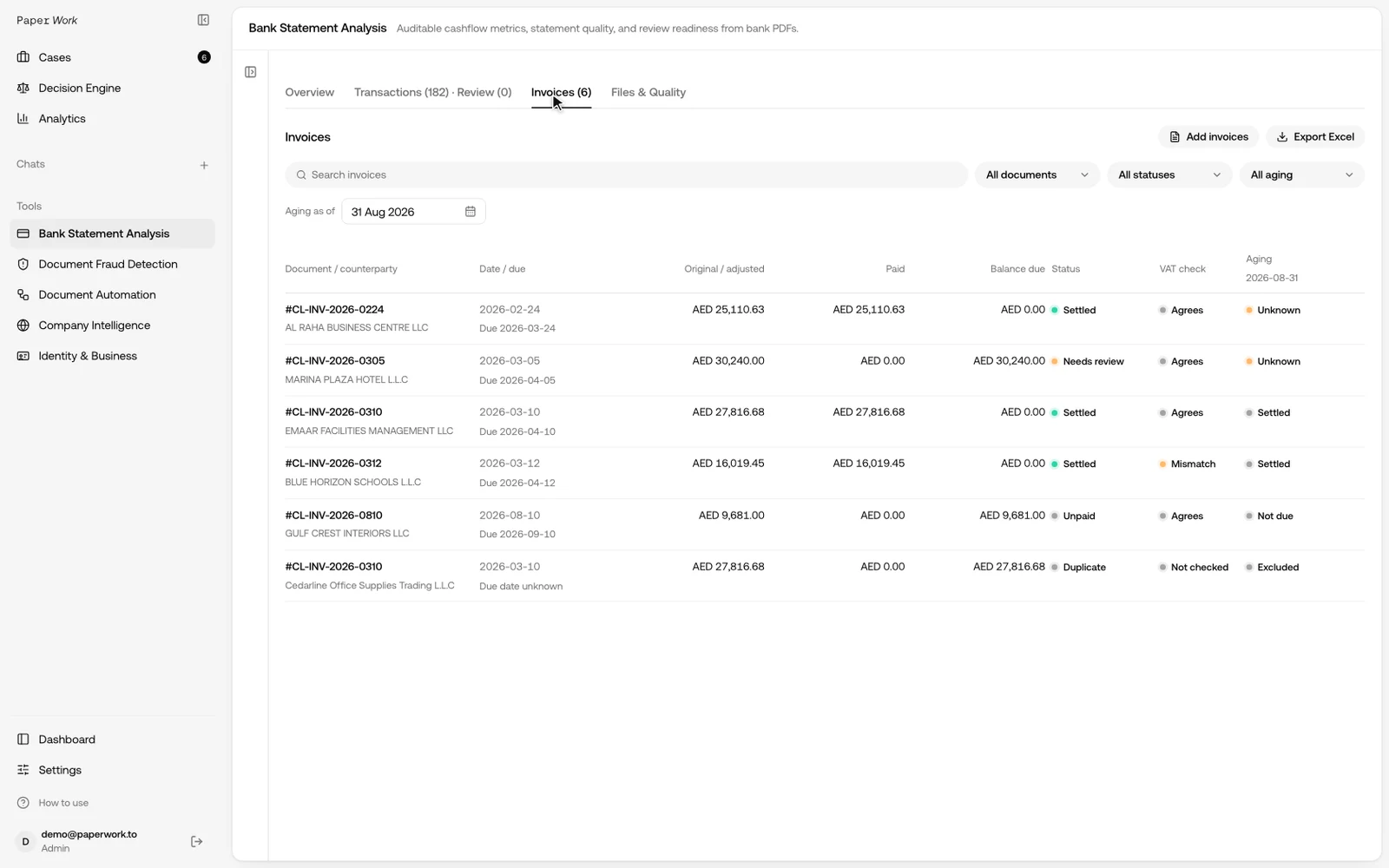
Opening an invoice shows the linked bank transaction with its date and statement page, and a reviewer can edit or unlink the payment. The statement analysis itself (cash flow, related parties and anomalies) runs on the same upload.
Configuring bank reconciliation with DA
A Document Automation scenario can be scoped around the customer’s statement and accounting exports. We define the fields, matching rules, exception handling and result the finance team needs, then test the configured process.
For an initial implementation, a controlled CSV or XLSX export from each side can make the rules explicit. PDF inputs require extraction checks; bank-specific statement formats must be confirmed.
For a full statement-to-ledger reconciliation, the scenario adds the customer’s date rules, payment allocation and handling of entries without a shared identifier.
Discuss your bank-reconciliation workflow with Document Automation. Bring examples of an ordinary period and one containing genuine exceptions, together with the expected matches.
Reconciliation for UAE and MENA operations
Businesses working across the UAE, Saudi Arabia, Qatar and Oman may have different banks, accounting systems and document layouts. A regional label does not establish that every format is supported.
Define the account and currency first, then test the exact export. Bilingual descriptions and shortened counterparty names should be part of the evaluation. Keep the result connected to both the bank record and the accounting entry.
Frequently asked questions
Can bank reconciliation run automatically?
Well-defined matches can be automated. The scope, supported formats and handling of ambiguous or incomplete records must be explicit. A review queue is part of the process.
Is matching the closing balance enough?
No. Different errors can cancel each other out. Reconciliation needs transaction-level support and an explanation of outstanding items.
Is a difference proof of fraud?
No. Fees, timing, omissions and errors can create differences. Possible document changes require their own investigation and evidence.
What is BRS in accounting?
BRS stands for bank reconciliation statement: the schedule that explains the difference between the bank statement balance and the cashbook balance on the same date.
Can BSA replace the accounting export?
BSA matches the invoices you upload to the statement payments. To reconcile every ledger entry, the process also needs the ledger export itself.
What should a pilot measure?
Correct matches, false matches, unmatched entries and retained exceptions. Include legitimate repeated payments and incomplete inputs. Measure how much supported work is completed rather than accepting a high match rate without checking its accuracy.