Anything you type into ChatGPT at work leaves your company the moment you press Enter. Depending on your plan and settings, it may be stored for months, read by a reviewer or used to train future models. The safe rule is simple: share the task, not the identities. This guide lists what not to share with ChatGPT, Claude, Gemini or Copilot, what each provider keeps by default, and how to keep using AI for real work without pasting real client data.
Key Takeaways
- On consumer plans, ChatGPT, Claude, Gemini and Copilot can all use your chats to improve their models unless you switch it off.
- Turning training off does not delete what you sent. Chats are still stored and can still be reviewed for abuse or safety.
- Most of the value of a prompt survives without the real names, numbers and IDs in it. Replace them with placeholders before you send.
- Passwords, API keys, card numbers and government ID numbers should never go into an AI chat, masked or not.
- Privacy Mask is a free Chrome extension that replaces personal data with placeholders in eight AI chats and cleans PDFs, Office files and images before upload. Detection runs in your browser.
Does ChatGPT save and train on what you type?
A prompt is not a private note. It is data sent to a third party under that party's terms. As of October 2026, the main assistants handle chats on free and personal plans like this:
| Assistant | Trains on chats by default | Where to turn it off | What is kept |
|---|---|---|---|
| ChatGPT | Yes | Settings, Data Controls, "Improve the model for everyone" | Chats until you delete them; Temporary Chats for 30 days |
| Claude | Yes, since the 2025 terms update | Settings, Privacy, "Help improve Claude" | Up to 5 years with training on, 30 days with it off |
| Gemini | Yes, while Keep Activity is on | Gemini Apps Activity, Keep Activity | 18 months by default; reviewed chats up to 3 years |
| Microsoft Copilot | Yes | Settings, Privacy, "Training on conversation activity" | 18 months of history |
Business plans are different. ChatGPT Business, Enterprise and Edu, Claude for Work and the API, and Microsoft 365 Copilot under a work account do not train on your data by default. That helps, but it does not settle the question: the data still leaves your company, is stored by a vendor and is visible to anyone with access to the workspace. And many employees use a personal account anyway.
Training is also not the only risk. A chat history can be exposed through a shared link, a compromised account, a browser extension with too many permissions or a colleague looking at your screen. Data you never sent cannot leak from any of those places.
Can ChatGPT leak your data?
It already has, in ways nobody planned. In March 2023 a bug in ChatGPT showed some users the titles of other people's chats, and for a few hours exposed the name, email, payment address and last four card digits of about 1.2% of active Plus subscribers, according to OpenAI. In 2025, shared ChatGPT links marked as discoverable turned up in Google search, some with names, CVs and confidential work content, until OpenAI removed the feature.
Neither case required a hacker or a careless provider policy. Both exposed data that users had typed in good faith. That is the strongest argument for keeping real identifiers out of the prompt in the first place.
Why it matters: the Samsung example
In 2023, Samsung engineers pasted internal source code and meeting notes into ChatGPT to fix bugs and summarise discussions. Within weeks the company banned generative AI tools on company devices, as Bloomberg reported. Nobody acted maliciously. They used a useful tool the way most people do: by pasting whatever was on the screen.
A ban did not make the work go away. It moved it to personal phones and accounts that the company could not see. The approach that holds up is to let people keep using AI and change what reaches it.
What not to share with ChatGPT: 12 things to keep out
- Passwords, API keys and access tokens. Never, in any form. Rotate a key if it has been pasted.
- Card numbers, CVVs and full bank account numbers or IBANs. Card data falls under PCI DSS; account numbers are enough to start a fraud attempt.
- Government ID numbers. Passport, Emirates ID, national insurance, social security and tax numbers identify a person on their own.
- Client names together with their details. A name next to an amount, a diagnosis or a dispute is personal data under GDPR and the UAE PDPL.
- Personal contact details. Private emails, phone numbers and home addresses of customers, candidates or employees.
- Health and HR records. Medical notes, sick leave, performance reviews, disciplinary cases and salaries.
- Financial statements and transaction lists that are not public. Bank statements, payroll files, revenue by client, unpublished results.
- Contracts and legal documents under negotiation. Party names, prices, special terms and anything covered by an NDA.
- Source code and internal system details. Proprietary code, infrastructure diagrams, internal hostnames and configuration files.
- Unreleased plans. Product launches, deal names, pricing changes, layoffs and M&A targets.
- Screenshots and scans with personal data in them. Images carry the same data as text, and it is easy to miss a name in the corner.
- Other people's messages. Customer emails, support tickets and chat logs contain data that their authors never agreed to share with an AI vendor.
The pattern behind the list: an AI needs the structure of the problem, not the identities in it. "Draft a reminder to a client about an overdue invoice of 4,200" works as well as the version with the client's real name, email and IBAN.
How to use ChatGPT at work safely
- Use a work account with training off. If your company has ChatGPT Business, Claude for Work or Microsoft 365 Copilot, use it instead of a personal account.
- Turn off training on personal accounts using the settings in the table above, and use Temporary Chat for one-off tasks.
- Replace identifiers with placeholders. Write [CLIENT_1], [EMAIL_1] and [AMOUNT_1] instead of the real values, and swap them back in the answer.
- Cut the document down. Paste the paragraph you need help with, not the whole contract or statement.
- Never paste credentials. Not even to debug a configuration file. Remove them first.
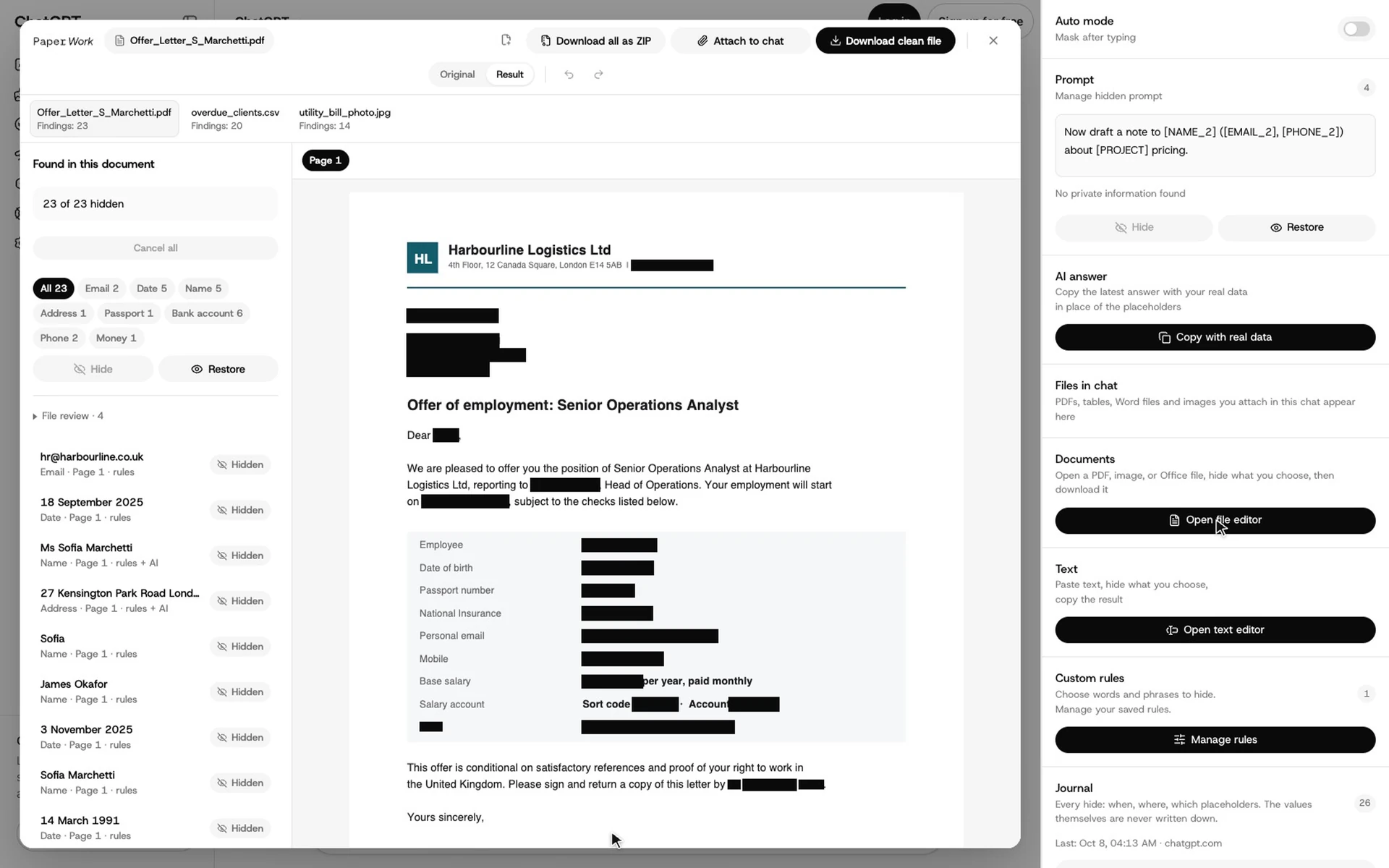
- Clean files before you upload them. A PDF or a photo needs the same treatment as text, and the hidden data must be removed, not just covered.
- Check what you are about to send. Read the prompt once before pressing Enter.
Doing this by hand works for one prompt. It does not work for forty prompts a day, which is why people stop doing it.
Mask personal data automatically with Privacy Mask
Privacy Mask is a free Chrome extension that does the placeholder step for you. It finds names, emails, phone numbers, IDs, card and account numbers, amounts and API keys in your prompt and replaces them before the prompt reaches the AI. It works on ChatGPT, Claude, Gemini, Google Search AI Mode, Grok, Microsoft Copilot, DeepSeek and Perplexity. Detection runs inside Chrome: the prompt text, your files and the hidden values are not sent to PaperWork.
Auto mode: the prompt is masked as you type
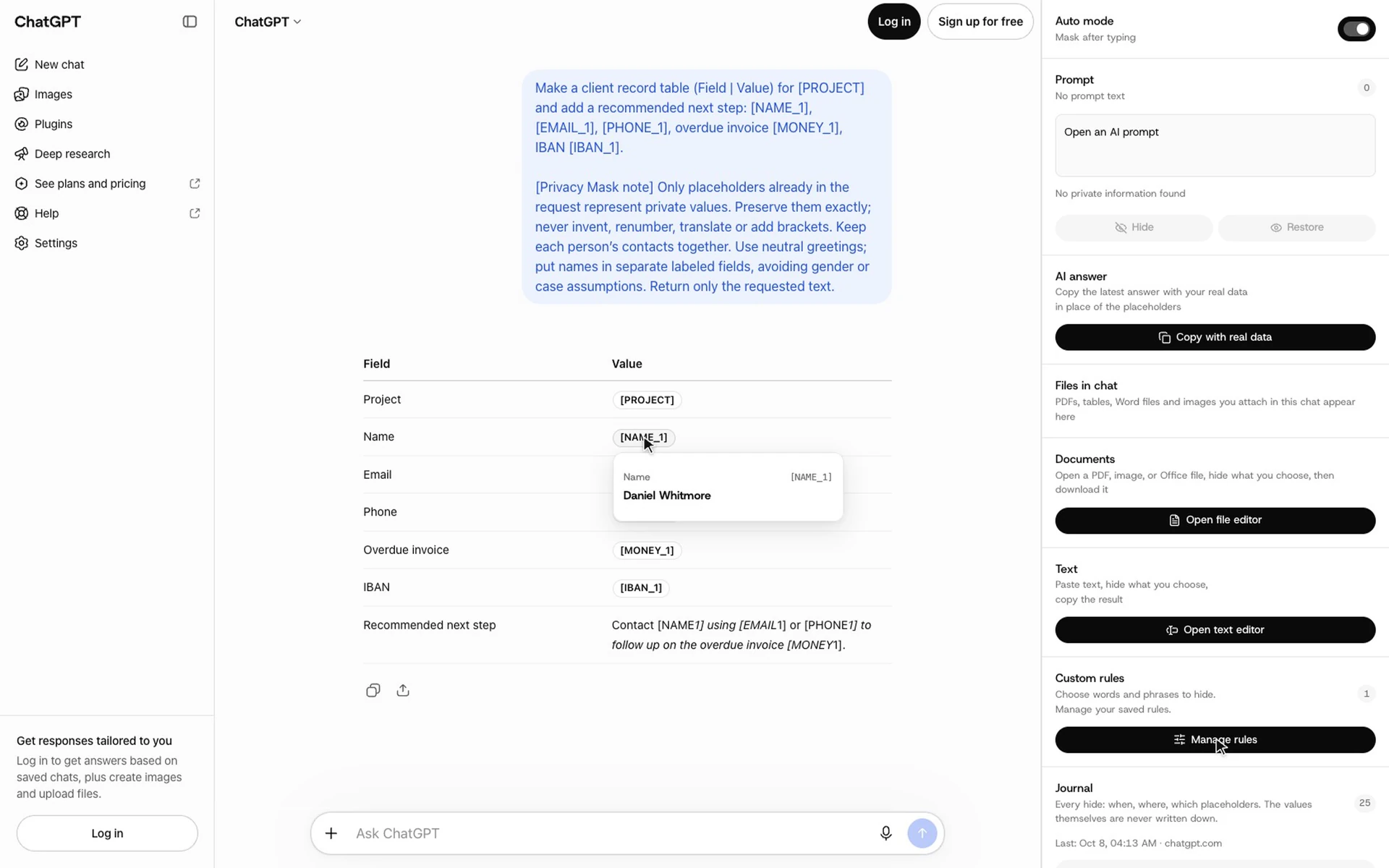
With Auto mode on, Privacy Mask replaces sensitive values in the ChatGPT input once you stop typing. The name becomes [NAME_1], the email [EMAIL_1], the IBAN [IBAN_1]. The AI receives only the placeholders, with a short note asking it to keep them unchanged.
Read the answer with the real values
The AI answers with placeholders. Hover over one to see the real value, which only your browser knows. "Copy with real data" copies the whole answer with the placeholders swapped back, ready to paste into an email or a document.
Manual mode: you decide when to hide
If you prefer to review first, turn Auto mode off. Type or paste the prompt, check what Privacy Mask found and click Hide. Restore puts the original text back if a value should stay visible.
Custom rules for project and client names
Some sensitive words are not personal data in the usual sense: a code name, a client's brand, a product that has not launched. Save them as custom rules and they are hidden everywhere, with the placeholder you choose. Rules stay on your device.
Clean PDFs, spreadsheets and photos before upload
The file editor opens PDF, Word, Excel, CSV and TSV files and images. It lists every finding by type, lets you keep or hide each one and downloads a clean copy, or all files as one ZIP. In PDFs and images the hidden areas are erased from the pixels rather than covered by a box, so the text cannot be copied out from underneath. Scans are read with OCR in English, Spanish and Russian.
The free plan covers 200 hides and 10 files a week without an account. Pro removes the limits for $9 a month or $60 a year. Add Privacy Mask to Chrome.
What masking does not solve
- Context can still identify someone. "The CFO of our only client in Fujairah" needs no name. Remove details that point to one person.
- Detection can miss things. An unusual ID format or a name written in lowercase may pass through. Check the prompt before you send it, and add custom rules for terms you use often.
- Trade secrets are not personal data. A pricing model or source code with every name removed is still confidential. Masking reduces the risk; it does not make every document safe to share.
- It does not replace a company policy. Masking is a control for individuals. The company still needs to decide which tools and accounts are allowed.
For full document anonymisation with an audit trail, for example before sending files to an outside processor, see document anonymization.
A short AI use policy for your team
If your company does not have one yet, these points cover most of the risk:
- List the AI tools and accounts that are approved for work, and prefer business plans with training off.
- Define data that never goes into AI chat: credentials, card data, government IDs, health records.
- Require placeholders for client and employee data, and say which tool does it.
- Require files to be cleaned before upload, with hidden data removed rather than covered.
- Say who to tell when something sensitive was sent by mistake, and what happens next (rotate the key, delete the chat, inform the data owner).
- Review the policy when providers change their terms. They changed several times in 2025.
For a deeper walkthrough of masking at work, with examples from finance, HR and support, read how to mask PII before using AI chat. For the extension's launch notes, see Privacy Mask for Chrome.
FAQ
What should you not share with ChatGPT?
Passwords and API keys, card and bank account numbers, government ID numbers, client and employee personal data, health and HR records, non-public financial data, contracts under negotiation, proprietary source code and unreleased plans. The same applies to screenshots and files that contain any of these.
Is it safe to put client data into ChatGPT?
Not as it is. On consumer plans the chat may be used for training and is stored by OpenAI; on any plan the data leaves your company. Replace client names and details with placeholders first, and use a business plan with training off.
Does ChatGPT keep what I type?
Yes. Regular chats stay in your history until you delete them. Temporary Chats are deleted after 30 days. Turning off "Improve the model for everyone" stops training on new chats but does not stop storage.
Is Claude or Gemini safer than ChatGPT?
Not by default. Claude's consumer plans have trained on chats by default since the 2025 terms update unless you opt out, and Gemini keeps activity for 18 months by default and lets reviewers read selected chats. Business plans of all three are safer than any consumer plan.
Can my employer see my ChatGPT chats?
On a company workspace such as ChatGPT Business or Enterprise, administrators can have access to workspace data under the company's settings. On a personal account they cannot see the chat, but the data you pasted has still left the company.
What happens if I already pasted sensitive data?
Delete the chat, rotate any credential that was in it and tell whoever owns the data, following your company's incident process. Deleting a chat removes it from your history; it does not undo a model review or training that already happened.
Does Privacy Mask send my text to a server?
No. Detection and masking run inside Chrome, including the optional local model. The AI chat receives the masked prompt when you send it; PaperWork does not receive your text, files or the hidden values.
Is Privacy Mask free?
Yes, for 200 hides and 10 files a week without an account. Pro is unlimited for $9 a month or $60 a year.
Sources
- OpenAI, Data Controls FAQ
- OpenAI, Enterprise privacy
- OpenAI, March 20 ChatGPT outage: here is what happened
- Search Engine Journal, OpenAI is pulling shared ChatGPT chats from Google Search, August 2025
- Anthropic, Updates to Consumer Terms and Privacy Policy
- Google, Gemini Apps Privacy Hub
- Microsoft, Copilot privacy controls
- Bloomberg, Samsung bans ChatGPT and other generative AI use by staff after leak, May 2023
- PCI Security Standards Council, PCI Data Security Standard