Bank statement analysis is the review of a borrower's bank transactions to measure revenue, cash flow and repayment capacity, and to spot risk before a credit decision. For SME lending, the first trap is simple: a business can receive money without making a sale. A transfer from another account, a director's contribution or a new loan increases bank credits, but each means something different for a credit review.
This guide covers what lenders look for in bank statements, how to analyze a statement step by step, the red flags worth checking and how to separate customer revenue from other credits. It ends with a worked example in PaperWork BSA on a synthetic statement, with video of each step.
Key Takeaways
- Total credits are not revenue. Loans, own-account transfers and related-party money all increase credits without being sales.
- A company profile with the borrower's own accounts and related companies is what lets an analysis separate those flows.
- Reconcile the running balance before trusting any figure built from the extracted rows.
- Every headline metric should open into the transactions behind it, so a reviewer can explain it.
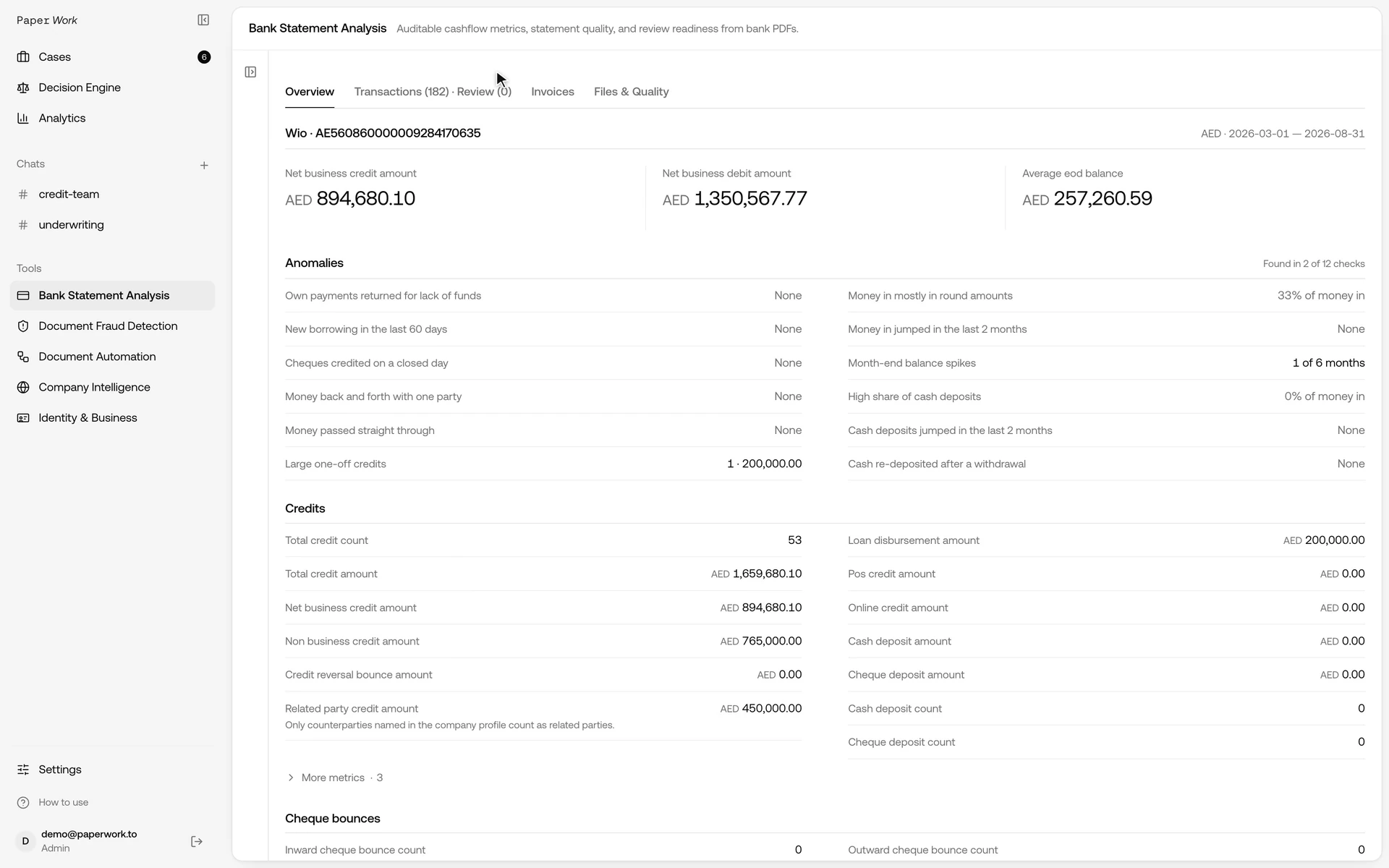
- In the worked example below, total credits of AED 1,659,680.10 contained only AED 894,680.10 of customer receipts.
Bank statement analysis on a sample statement
The recording uses a synthetic Wio Business statement for a fictional Dubai trading company, Cedarline Office Supplies. It shows the upload, a company profile with the company's own account and a sister company excluded from cash flow, the report, the related-party breakdown, the supporting transactions and the Excel export. Processing waits and typing are shortened in the edit.
In this six-month example the account received AED 1,659,680.10. With the profile in place, PaperWork counted AED 894,680.10 as net business credits:
| Credits in the example | AED | Treatment in the report |
|---|---|---|
| Payments from six customers | 894,680.10 | Net business credits |
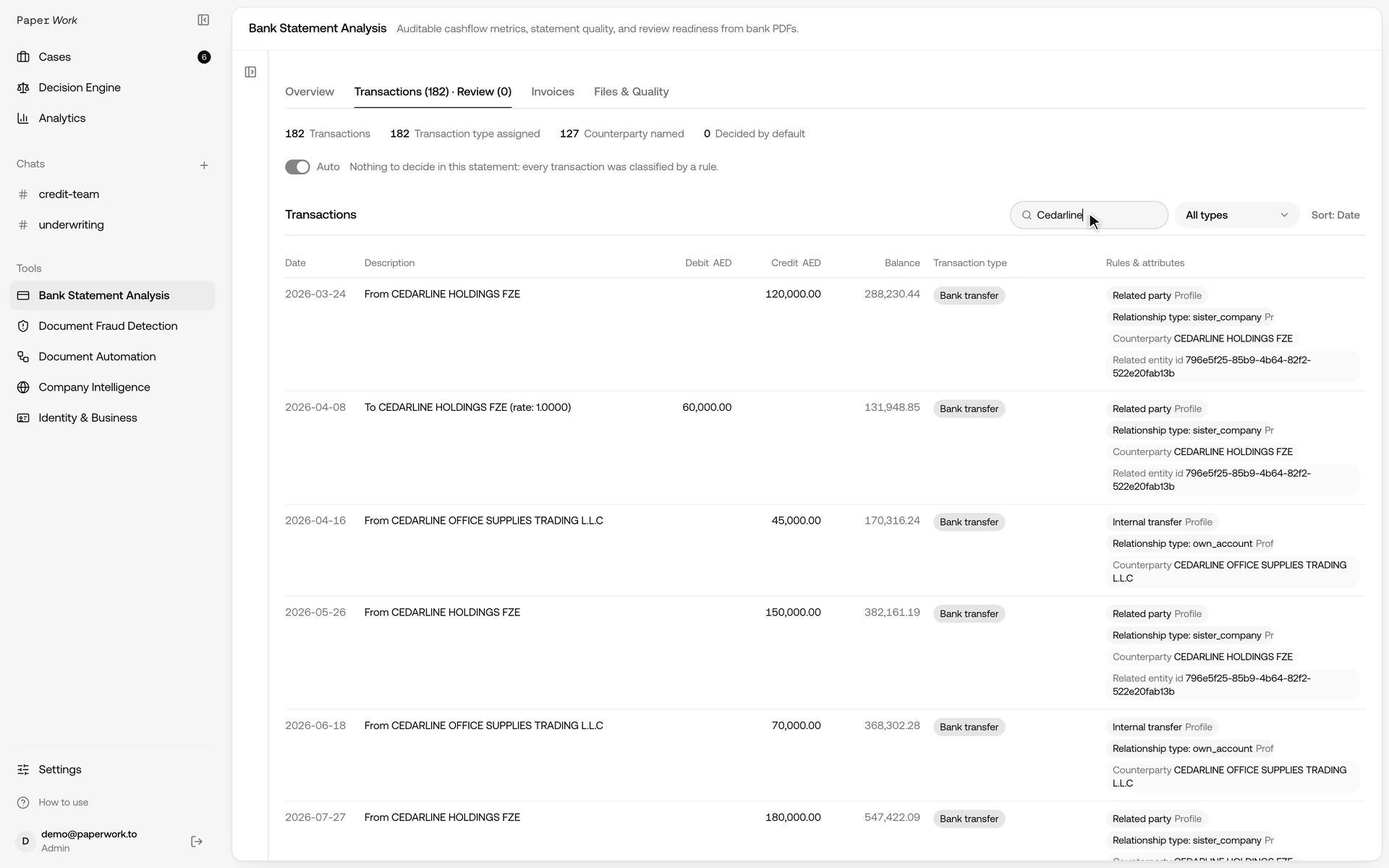
| Sister company, three transfers | 450,000.00 | Related party, excluded by the profile |
| Business loan disbursement | 200,000.00 | Financing, excluded |
| Transfers from the company's own account at another bank | 115,000.00 | Internal transfer, excluded |
| Total credits | 1,659,680.10 |
Read on its own, the total would overstate customer receipts by more than 85%. The figures come from the recorded run on synthetic data; they illustrate the method and say nothing about any real company.
What lenders look for in bank statements
A lender reads a business bank statement to answer three questions: how much the business really earns, whether it can carry another repayment, and whether anything in the account contradicts the application. These are the figures most credit teams work from.
| Metric | What it tells the lender |
|---|---|
| Net business credits | Customer receipts after loans, own-account transfers and related-party money are removed |
| Monthly credit trend | Whether revenue is stable, seasonal, growing or falling |
| Average and minimum end-of-day balance | The cushion the account keeps and how close it runs to zero |
| Days overdrawn | How often the business relies on an overdraft |
| Existing loan and card repayments | Debt already serviced from the account |
| New borrowing | Loans disbursed shortly before the application |
| Returned cheques and payments | Payments that bounced for lack of funds |
| Cash deposit share | How much of the money in arrives as cash, which is harder to trace |
PaperWork reports these per month, together with total credits, non-business credits, related-party credits and loan disbursements, so the analyst can explain why money entered the account before using it in a credit assessment.
How to analyze a bank statement step by step
- Collect the full period. Ask for every operating account and the months your policy requires, commonly six to twelve for SME credit. An incomplete period is not evidence of no trading.
- Check the documents. Confirm the account holder, account numbers, currencies and dates, and run document fraud checks on the files.
- Extract and reconcile. Turn each statement into transactions and check that every running balance follows from the previous one. A statement that does not reconcile needs investigation first.
- Classify every transaction. Salaries, rent, loan repayments, cheque returns, transfers and customer receipts each need a type.
- Separate non-business credits. Remove loan disbursements, transfers between the company's own accounts and related-party money from the revenue figure.
- Calculate the metrics. Monthly net business credits, balances, overdraft days, existing repayments and returned payments.
- Review the red flags. Look at round-tripping, pass-through money, cash surges and new borrowing before the application.
- Cross-check the rest of the file. Compare the statement figures with the trade licence, VAT returns, financial statements and the amounts stated in the application.
- Record the result and its limits. Keep the period, accounts, metric status and the decisions you made, so the next reviewer can follow them.
Done by hand, steps 3 to 6 take most of the time. Automated bank statement analysis does them in minutes, and the analyst's work moves to steps 5, 7, 8 and 9, where judgement is needed.
Business cash flow analysis: total credits are not revenue
Total credits describe incoming movements in an account. They do not, by themselves, establish customer revenue, profit or repayment capacity.
PaperWork reports total credits separately from net business credits, non-business credits, related-party credits and loan disbursements. These views help the analyst explain why money entered the account before using it in a credit assessment.
The following table is a review guide. It is not a claim that every bank description can establish the economic purpose of a payment automatically.
| Incoming movement | What the analyst needs to establish |
|---|---|
| Customer payment | Whether it represents business receipts, with any necessary supporting evidence |
| Transfer from another company account | Whether it is an internal movement that would otherwise be counted twice |
| Payment from a director or related company | The relationship and the appropriate cash flow treatment |
| Loan disbursement | Whether the credit is financing rather than operating receipts |
| Cash deposit | Its source and purpose; the payment channel alone does not settle the question |
| Reversal or returned payment | Which earlier movement it corrects and how it affects the review |
A statement-derived business credit figure is not audited accounting revenue. Timing, VAT, settlement deductions and transactions outside the supplied accounts can still require reconciliation with the company's records.
Start with the company profile
Before analysing the files, add the legal company, its own accounts and relevant related people or companies. Include known aliases where they help connect bank descriptions to the right party.
This context matters because a statement may show a counterparty name without describing its relationship to the applicant. The product cannot infer every company relationship from a PDF.
PaperWork's upload screen warns that, without a profile, a transfer between the company's own accounts is counted as ordinary revenue and as an expense. Supplying the accounts is therefore part of preparing the analysis, not just filling in a customer label.
For related parties, record the intended cash flow treatment. In the recording, the profile is configured to exclude the related company's movements from business cash flow. That is an explicit choice for the example, not a universal rule that every related-party receipt must always be excluded.
Check the statements before relying on the result
Choose the statements and the report period, then run the analysis. Review which files and account periods actually made it into the result.
PaperWork reads each supported statement layout with a dedicated parser and checks the running balance line by line. A statement that does not reconcile is stopped rather than guessed, and a reconciliation error needs investigation before a credit officer relies on the figures built from those rows.
Also inspect missing and partial months, account identities and currencies. Up to 50 PDFs can go into one job; overlapping periods are de-duplicated and missing or partial months are listed in the report. Accounts in different currencies should not be added together as if the amounts were directly comparable.
A successful balance check establishes internal consistency of the extracted movements. It does not prove that the source document is authentic. Document fraud checks are a separate part of the review.
Red flags in a business bank statement
Some patterns deserve a closer look whatever the headline revenue says. PaperWork flags each of these with the transactions behind it:
- Round-tripping: money sent out and returned by the same party, which inflates turnover.
- Pass-through money: large credits that leave the account almost immediately.
- Cash surges: cash deposits that jump in the months before an application.
- Returned payments: the business's own payments returned for lack of funds.
- Large one-off credits: a single receipt far above the usual pattern.
- New borrowing: a loan disbursed shortly before the application.
- Month-end balance spikes: balances raised just before a statement date.
A flag is a reason to ask a question, not proof of misconduct. For the patterns UAE lenders see most often, read bank statement red flags in UAE lending.
Open the number and inspect the rows behind it
In Overview, compare total credits with the business and non-business credit metrics. Open a metric's breakdown to examine its definition, monthly values and supporting transactions.
The related-party credit breakdown lets the reviewer inspect the movements associated with the recorded relationship instead of accepting a single aggregate without context. The Transactions view also supports search and filtering for a closer review of a counterparty.
Use this inspection to answer a concrete question: which receipts are affecting the business cash flow view, and why? A legitimate transfer can still need different treatment from a customer receipt.
Resolve ambiguity before treating a figure as final
Automated bank statement analysis still leaves decisions to the reviewer. PaperWork offers automatic classification and review workflows. Analysts can inspect unclear items, change transaction types and record supported cash flow decisions.
Automatic mode uses defaults for some ambiguous movements. Those defaults are processing choices, not additional facts about the transaction. A reviewer should understand the mode used and revisit a decision when the supplied evidence supports a different treatment.
Read a metric's status alongside its value. Verified, estimated and unavailable results do not mean the same thing. An unavailable figure must not be substituted with zero; an estimated figure needs its qualification preserved.
After applying a correction, wait for the analysis to update and inspect the affected metrics again. Exporting the first result and then editing the dashboard can otherwise leave a credit memo based on an older view.
Manual vs automated bank statement analysis
| Manual review | Automated analysis | |
|---|---|---|
| Data entry | Re-typing or copying rows from PDFs | Transactions extracted from the statement |
| Balance check | Spot checks, if any | Every running balance reconciled |
| Classification | Analyst judgement on each row | Rules for each transaction, with review of unclear items |
| Related parties | Depends on what the analyst remembers | Taken from the company profile |
| Audit trail | Notes and spreadsheets | Each metric opens into its transactions |
| Output | A spreadsheet per analyst | Dashboard, Excel and API in one format |
A bank statement analyzer does not replace the credit decision. It removes the copying and arithmetic, so the analyst's time goes to the questions only a person can answer.
Take the reviewed result into the lending workflow
The dashboard provides an Excel export, and the BSA API returns the same structured result for integration. Use the result after the relevant review decisions have been applied.
The handoff should preserve the account and period, metric status, supporting movements and material limitations. A headline revenue number without its scope makes it harder for the next reviewer to understand what was actually assessed.
For a pilot, agree on the statements, expected classifications, known related parties and output your team needs. Evaluate whether the result is reproducible and whether the reviewer can explain discrepancies on your own statement layouts.
FAQ
What is bank statement analysis?
It is the review of an applicant's bank transactions to measure revenue, cash flow, balances and existing debt, and to spot risk signals before a lending decision. For businesses, the key step is separating customer receipts from loans, own-account transfers and related-party money.
How many months of bank statements do lenders need?
It depends on the lender's policy. Six months is a common minimum for SME credit, and twelve months shows seasonality more clearly. Every operating account for the period should be included.
What do lenders look for in business bank statements?
Net business credits and their monthly trend, average and minimum balances, days overdrawn, existing loan repayments, new borrowing, returned payments and cash deposit share, together with red flags such as round-tripping and pass-through money.
Can bank statement analysis detect fraud?
Partly. A balance chain that does not reconcile, round-tripping or month-end spikes can point to an edited statement or a staged account. Checking whether the PDF itself was altered is a separate step; PaperWork runs it in document fraud detection.
Does every incoming credit count as revenue?
No. Financing, internal transfers, related-party movements and reversals can increase credits without representing customer receipts. Their treatment depends on the transaction evidence and the review policy.
Can software analyze bank statements automatically?
Yes. Bank statement analysis software extracts the transactions, reconciles balances, classifies each row and calculates the metrics. The analyst still reviews unclear items, related parties and red flags before the result is used.
Does PaperWork identify every related party automatically?
No. A company profile supplies known accounts and related entities. Incomplete context or unclear bank descriptions can still require an analyst's review.
Is this a replacement for accounting reconciliation or a credit decision?
No. It produces a statement-based cash flow analysis. Accounting records, other evidence and the lender's policy remain relevant to the final assessment.
Can we use the API instead of the dashboard?
Yes. The BSA API returns the same structured result as the dashboard and the Excel export. Start by validating the required statement layouts and result on a representative package.
Try the workflow on a representative package
Bring the statements, known own accounts and related parties, and the result your credit team needs. We can review the supported layouts and agree on an acceptance scope before an integration.
Request a BSA demo, review PaperWork BSA or see how it fits lending teams. For supplier evaluation, see our comparison of bank statement analysis software.