A goods received note, or GRN, records what a business has received from a supplier. It gives the purchasing and finance teams evidence to compare with the purchase order and the supplier’s invoice.
The distinction is practical: an order records what was requested, an invoice records what is being charged, and a receiving record records what arrived. Those quantities can differ without the documents being forged.
This guide explains the document, a worked three-way matching example and how a Document Automation workflow checks an invoice against the goods received.
What is a goods received note (GRN)?
GRN is short for goods received note, also called a goods receipt note. The GRN meaning is the same in both forms: the buyer’s own record that a delivery arrived, what it contained and what was accepted.
A GRN is normally an internal receiving record. It identifies the delivery, the relevant order and the goods accepted by the receiving team. Depending on the process, it may also record rejected or damaged items.
“Goods receipt note” is a common name for the same type of record. The layout and approval process vary between organisations. Force Intellect describes the GRN as the purchaser’s receiving record and explains its use when cross-checking supplier invoices. GRN overview.
A signed delivery note can be relevant evidence, but do not assume every supplier’s delivery note contains the same acceptance information as your internal GRN.
GRN, purchase order, invoice and delivery note
| Document | Main question | Typical information |
|---|---|---|
| Purchase order | What did the buyer agree to order? | Supplier, order reference, items, quantities and agreed prices |
| Delivery note | What does the supplier say was delivered? | Delivery reference, items and dispatched quantities |
| GRN | What did the receiving team record as received or accepted? | Receipt date, order reference, quantities and exceptions |
| Invoice | What is the supplier asking the buyer to pay? | Invoice number, order reference, prices, quantities and totals |
Keep the document references separate. The invoice number is not the PO number. A delivery reference is not automatically the receipt identifier used by the buyer.
This separation also helps an automated process: a number appearing on two pages is not enough to establish that the documents refer to the same order.
GRN format: what a goods received note contains
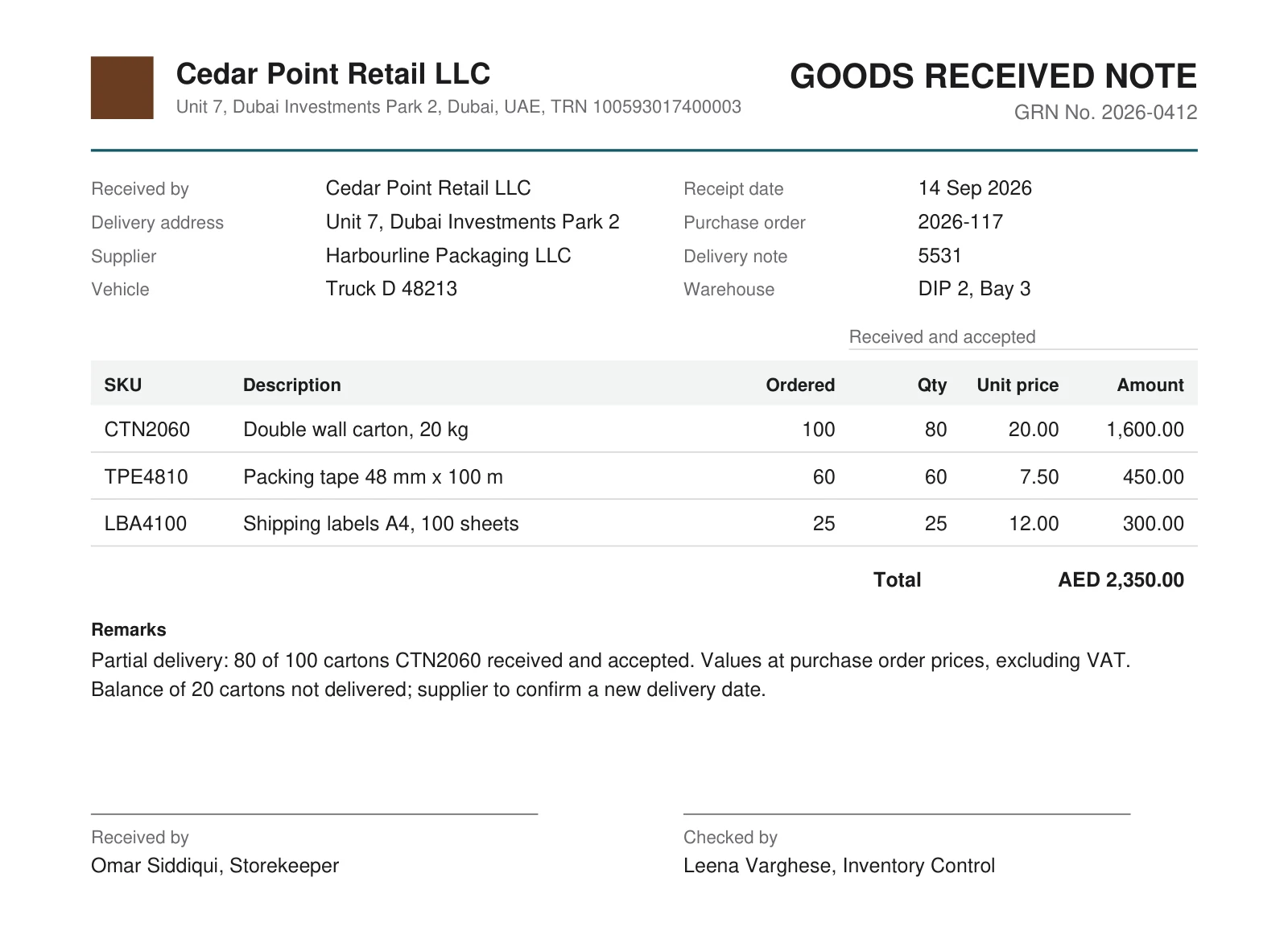
The useful fields depend on the process, but a receiving record commonly needs:
- the buyer and supplier;
- a receipt identifier and receipt date;
- the purchase-order reference and any delivery-note reference;
- a stable item identifier or agreed matching key;
- quantity received and, where relevant, quantity accepted or rejected;
- units of measure;
- the receiving person or approval record;
- comments explaining a shortage, substitution or damage.
Treat missing information according to its role. A missing matching key may prevent a row-level check even if the document is otherwise readable. A field that the process never uses should not be invented or silently filled from another document.
For the order side of the process, see purchase-order fields and invoice checks. For shipment records, see delivery notes and their difference from a GRN.
A three-way matching example
The following figures are illustrative, not a report from a customer deployment.
A PO orders 100 cartons of item CTN2060 at AED 20 each. The receiving team records 80 cartons. The supplier invoices 100 cartons at AED 20.
| Check | PO | GRN | Invoice | Review result |
|---|---|---|---|---|
| Item | CTN2060 | CTN2060 | CTN2060 | Same recorded item |
| Quantity | 100 | 80 | 100 | Invoice exceeds recorded receipt by 20 |
| Unit price | AED 20 | Not required here | AED 20 | Invoice price agrees with the order |
| Invoice subtotal | — | — | AED 2,000 | 100 × AED 20 |
The discrepancy is AED 400 of goods billed above the recorded receipt at that price. It is a question for review, not automatic proof of fraud. The remaining goods might be in a later delivery, the receiving record might be incomplete, or the agreed payment terms might allow a different billing basis.
If the invoice instead bills 80 cartons, its subtotal is AED 1,600. Whether that partial invoice can pass depends on the buyer’s policy for partial deliveries and remaining order quantities.
Oracle’s purchasing documentation describes three-way matching as checking order, receipt and invoice quantities within configured tolerances. The policy and tolerance are part of the process. Oracle matching controls.
Checks that matter beyond the totals
Order and party references
Confirm that the buyer, supplier and PO reference agree. A correct total on the wrong order does not establish a match.
Items and units
A box and a single unit can share an item description while representing different quantities. Agree how the process handles units, substitutions and service lines.
Received, accepted and invoiced quantities
Specify which receiving quantity controls payment. A delivery can include damaged items, and a later receipt can complete an earlier shortage.
Prices, currency and arithmetic
Compare invoice prices with the agreement and check the arithmetic. A GRN may contain no prices; that absence should not turn into a zero price.
Duplicate and repeated records
A reuploaded receiving record must not count as another delivery. Repeated item keys also require care: several legitimate lines can use the same SKU.
How a DA workflow can handle the package
A Document Automation scenario identifies the documents, extracts their fields and tables, applies the agreed checks and produces a reviewable result.
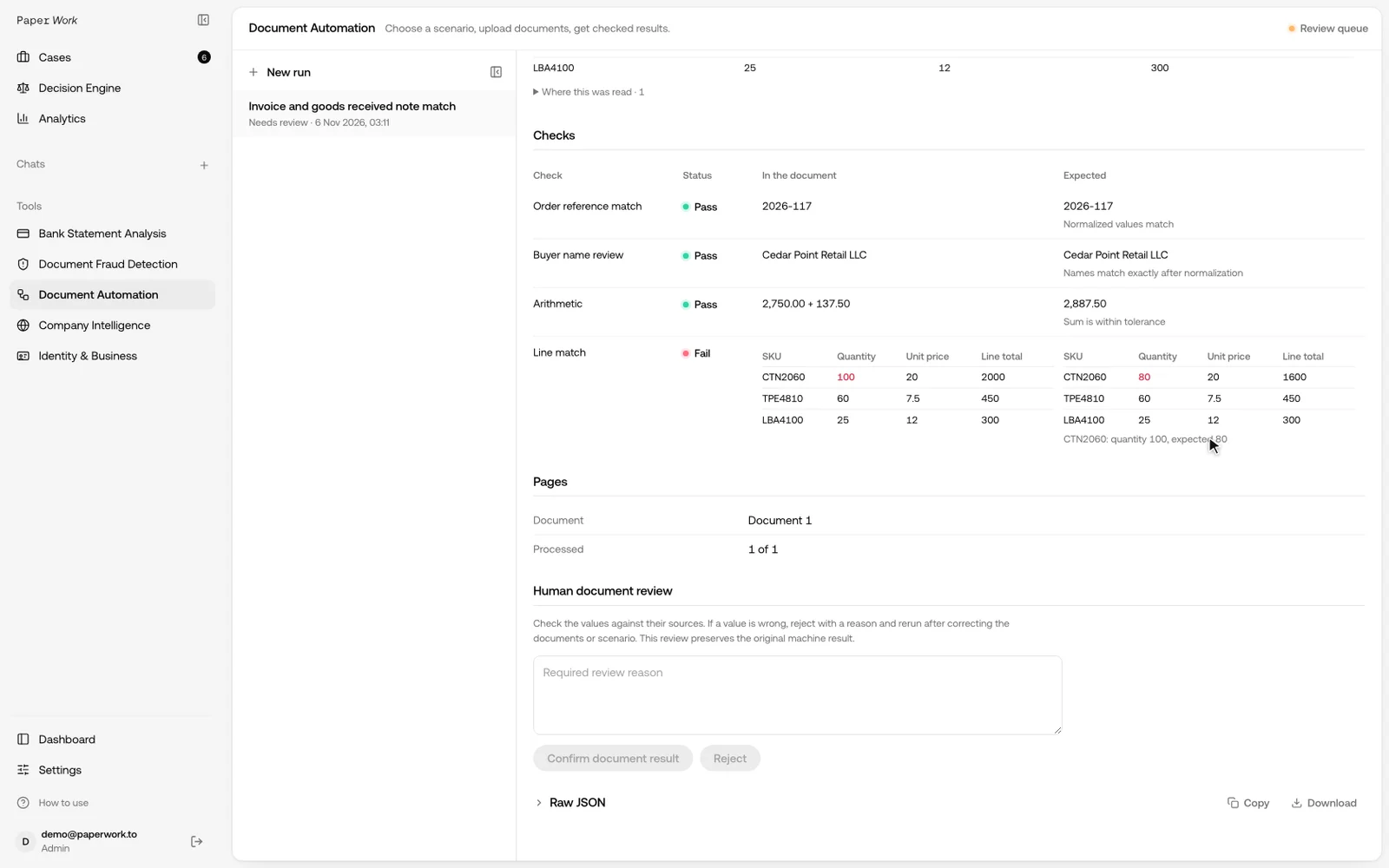
In the video above, the supplier invoice is the input and the GRN is the reference. DA reads both, compares the order reference and buyer, checks the invoice arithmetic, then matches line items by SKU and compares quantities. The invoice bills 100 cartons of CTN2060; the GRN records 80, so the line is flagged with both values, and each extracted field keeps the place on the page where it was read.
The same approach extends to the purchase order: an invoice-and-PO template is already available, and a full three-way scenario adds the customer’s receiving rules and tolerances. We agree the inputs, line keys, tolerances and outputs, then test those rules against expected results.
The reviewer receives the compared values and their sources, missing documents and specific discrepancies, and the result can be sent to your ERP as JSON.
Discuss invoice, PO and GRN matching with Document Automation.
GRN workflows for MENA teams
For a UAE, Saudi, Qatari or Omani operation, start with the documents actually used by procurement, receiving and finance. English and Arabic names, supplier item codes and local document layouts can differ across the same group.
The document workflow checks recorded information. Physical receipt, quality inspection, supplier approval and payment authority still need their assigned business owners. Any country-specific tax or electronic-invoicing requirements need their own confirmed process.
Frequently asked questions
Is a GRN the same as an invoice?
No. A GRN records receipt; an invoice requests payment. Comparing them is useful precisely because they represent different parts of the transaction.
Does every difference mean the invoice should be rejected?
No. The process may allow partial deliveries, price tolerances or a later correction. The result should show the difference and apply the agreed routing.
Can a workflow compare more than three files?
The document package and checks can be configured for the customer. Multiple invoices, deliveries or orders need explicit allocation rules so a receipt or quantity is not counted twice.
Can PDF tampering checks run alongside matching?
Fraud Detection addresses signs of changes to the files. Matching addresses consistency between the recorded order, receipt and invoice. The two checks answer different questions.