A purchase order, or PO, is a buyer's record of an order sent to a supplier. It identifies what the buyer wants to purchase, the quantities, agreed prices and the references needed to fulfil and check that order.
A PO answers what was ordered. An invoice answers what the supplier has billed. A delivery note describes the shipment, while a goods received note records what the buyer received. Keeping these records separate makes discrepancies easier to explain.
This guide covers a practical PO format, the order-to-invoice process and the checks that can be configured in Document Automation. It uses an illustrative procurement example, rather than a downloadable blank form.
What is a purchase order used for?
A PO gives procurement, receiving and finance a shared order reference. The purchasing team records the approved request; the receiving team checks deliveries against it; accounts payable uses the order and receiving evidence when reviewing the invoice.
Oracle Purchasing distinguishes standard, planned, blanket and contract purchasing documents. For a routine one-off purchase, a standard order commonly records known items, quantities and prices. A business with scheduled releases or changing quantities needs to define those arrangements explicitly.
The document's role depends on the agreement and the organisation's controls. A readable PO does not by itself establish that the supplier accepted every term, that goods arrived or that payment is authorised.
Purchase order format: the fields that matter
| Field | Why it matters for a check |
|---|---|
| PO number and revision | Identifies the order and the approved version |
| Buyer and supplier | Keeps the invoice attached to the correct parties |
| Order and required-delivery dates | Establishes the expected timing |
| Ship-to details | Identifies the receiving location |
| Item code and description | Supports row-level matching |
| Quantity and unit of measure | Distinguishes cartons, packs and individual units |
| Unit price and currency | Establishes the amount agreed for each item |
| Charges and totals | Makes freight, discounts and other amounts explicit |
| Approval reference | Connects the document to the buyer's authorisation process |
An extraction workflow should preserve missing fields. If the PO contains no item code, use an agreed alternative matching key or return the line for review. Do not manufacture a code from a similar-looking description.
Keep revisions explicit. Comparing an invoice with an obsolete PO can create an apparent price error even when the supplier followed the latest approved order.
Read the completed purchase order
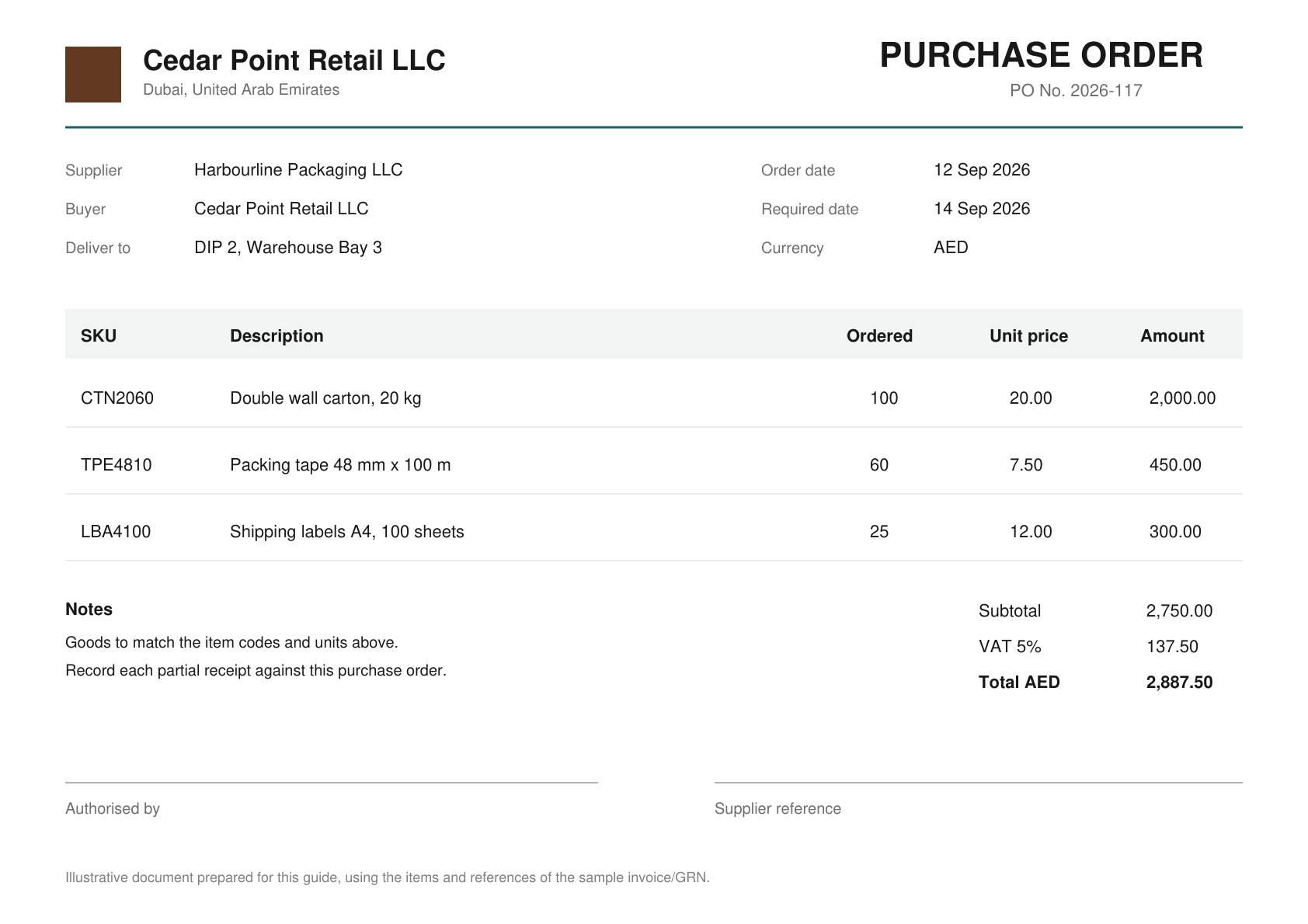
The sample order above is issued by Cedar Point Retail LLC to Harbourline Packaging LLC. It has a stable reference, 2026-117, and identifies the delivery location. It is more useful for a comparison than a blank template because every field can be followed into the later records.
There are three ordered lines:
| Item | Ordered quantity | Unit price | Ordered value |
|---|---|---|---|
| CTN2060: double-wall cartons | 100 | AED 20.00 | AED 2,000.00 |
| TPE4810: packing tape | 60 | AED 7.50 | AED 450.00 |
| LBA4100: shipping labels | 25 | AED 12.00 | AED 300.00 |
| Total before VAT | AED 2,750.00 |
The order's identifiers do three jobs. The PO number links the package; the supplier and buyer identify the parties; the SKU identifies the line being compared. A total of AED 2,750 without those references would not tell a reviewer which receipt or invoice belongs to it.
The units deserve their own check. The carton description includes a 20 kg specification; that does not mean the ordered quantity is 20. The tape description includes 48 mm and 100 m; those numbers describe the product, while 60 is the ordered quantity. An extraction process must keep product specifications separate from transaction quantities.
Dates and revisions are equally practical. An invoice can reference the correct PO number but an earlier approved price. Preserve the revision that the buyer intends to use and any later change, rather than selecting whichever order produces a match.
Purchase order versus invoice, delivery note and GRN
| Record | Created for | Main question |
|---|---|---|
| Purchase order | The buyer's purchasing process | What was ordered and at what agreed price? |
| Delivery note | The shipment or dispatch | What does the sender list as delivered? |
| Goods received note | The buyer's receiving process | What quantity was recorded as received or accepted? |
| Invoice | The supplier's billing process | What amount is being requested? |
One document can reference another without replacing it. A delivery note quoting the PO number is useful evidence of the shipment's intended destination; it is not an independent count by the receiving team.
For the receiving perspective, see what a GRN records. For shipment details, see the delivery note guide.
From order to invoice: a practical sequence
1. Approve and issue the order
Agree who can approve quantities, prices and changes. Preserve the supplier reference and the approved revision. An automated comparison needs to know which version controls the check.
2. Record each receipt
Receiving may happen in several deliveries. Record the quantity received, damaged or rejected, the delivery reference and the outstanding order quantity. Re-uploading one receipt should not create a second delivery.
3. Compare the invoice with the right records
Two-way matching compares the invoice with the PO. A three-way process also uses receiving evidence. The policy determines how partial deliveries, price tolerances and missing receipts are handled.
4. Review and retain the result
Show the compared values, their sources and each unresolved difference. Payment approval remains part of the customer's own process; a matching result supplies evidence for that decision.
Two-way matching: read the invoice against the order
The supplier invoice in the sample package is 26-0418, dated 15 September 2026. It references PO 2026-117, names Cedar Point Retail LLC as the buyer and bills the same three item codes. Its subtotal is AED 2,750, with AED 137.50 VAT in this example and a total of AED 2,887.50.
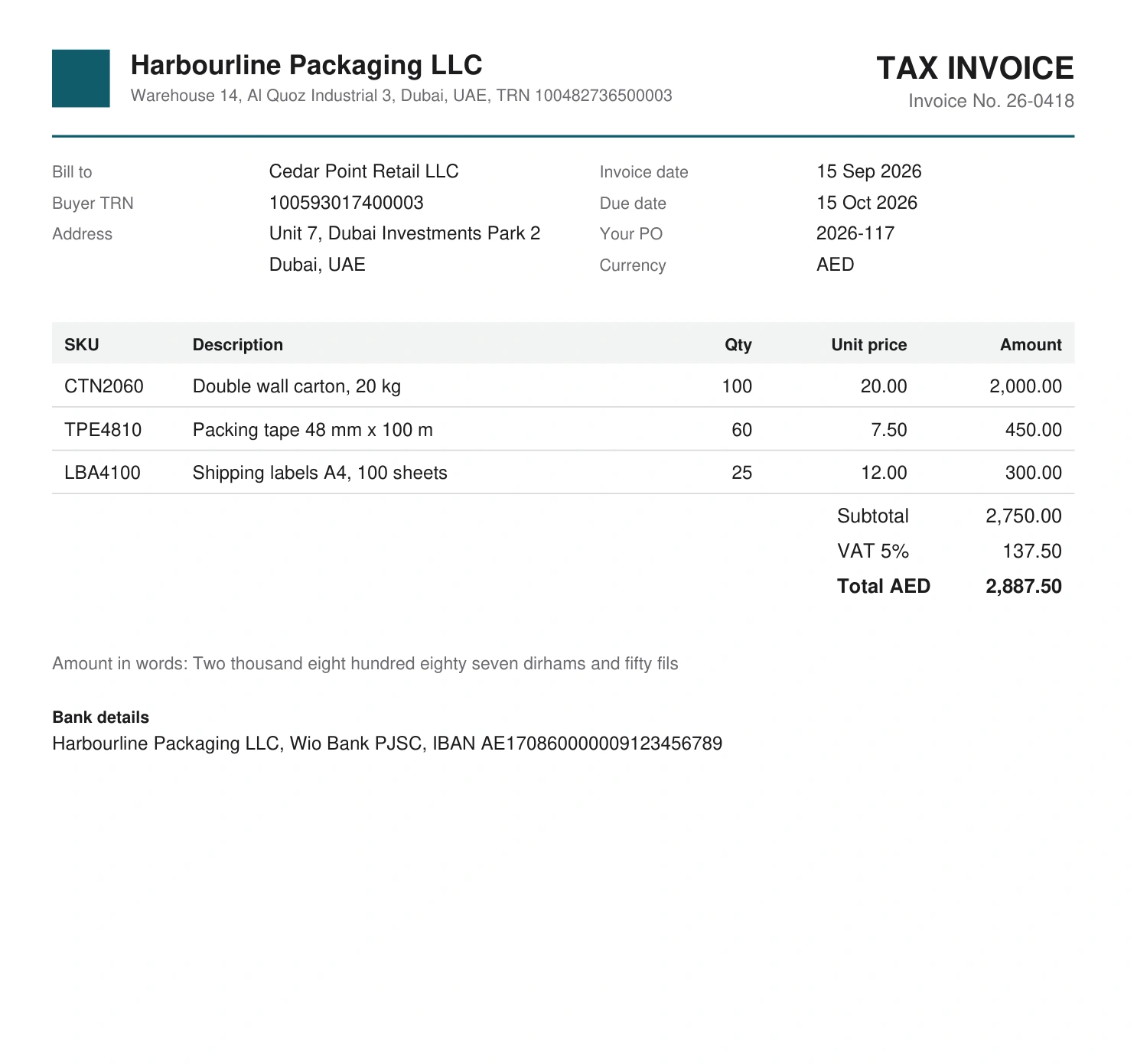
A two-way review starts with identity and scope, then moves to the lines. Confirm the buyer, supplier, reference and currency before comparing numbers. Otherwise a correct multiplication can help the wrong invoice appear acceptable.
Next compare each billed line with the approved order. In this example, 100 × 20 = 2,000; 60 × 7.50 = 450; and 25 × 12 = 300. The sum is 2,750. The invoice arithmetic is internally consistent, and the billed quantities and prices agree with this illustrative PO.
That result answers whether the bill agrees with the order. It does not answer whether the receiving team recorded the full delivery. Keep that second question separate when deciding which records your accounts-payable process needs.
The existing DA demonstration below shows invoice-to-order checking and another mixed-document run. It uses its own sample files. The invoice/GRN case that follows uses the Harbourline and Cedar Point records illustrated in this guide.
A purchase-order matching example
Assume a PO orders 100 cartons of CTN2060 at AED 20 each. Its subtotal is AED 2,000. A supplier invoices the same quantity and price, but the buyer's receiving record lists only 80 cartons.
The invoice agrees with the order on price and ordered quantity. It still exceeds the recorded receipt by 20 cartons, worth AED 400 at that unit price. A PO-only check and a receipt-based check therefore answer different questions.
The recording below shows the invoice checked against the GRN. It demonstrates the receiving side of the example; it does not show a purchase order being created or a complete three-way approval process.
Three-way matching: follow the receiving difference
The GRN changes the result of the review. It records 80 cartons received and accepted, while the tape and labels arrive in full. At the agreed PO prices, the recorded receipt is worth AED 2,350 before VAT.
| Item | PO quantity | GRN quantity | Invoice quantity | Difference to investigate |
|---|---|---|---|---|
| CTN2060 | 100 | 80 | 100 | 20 cartons billed above recorded receipt |
| TPE4810 | 60 | 60 | 60 | Quantities agree |
| LBA4100 | 25 | 25 | 25 | Quantities agree |
The shortage is specific: 20 × AED 20 = AED 400 before VAT on the carton line. It is not the entire invoice total, and it is not a price discrepancy. Recording the type of difference helps the buyer ask the right follow-up question.
If the process is based on paying only for accepted receipts, the finance team needs to resolve that quantity before releasing the full billed amount. The organisation might request the remaining goods, a corrected bill or another agreed document. Which action is appropriate comes from the agreement and payment policy.
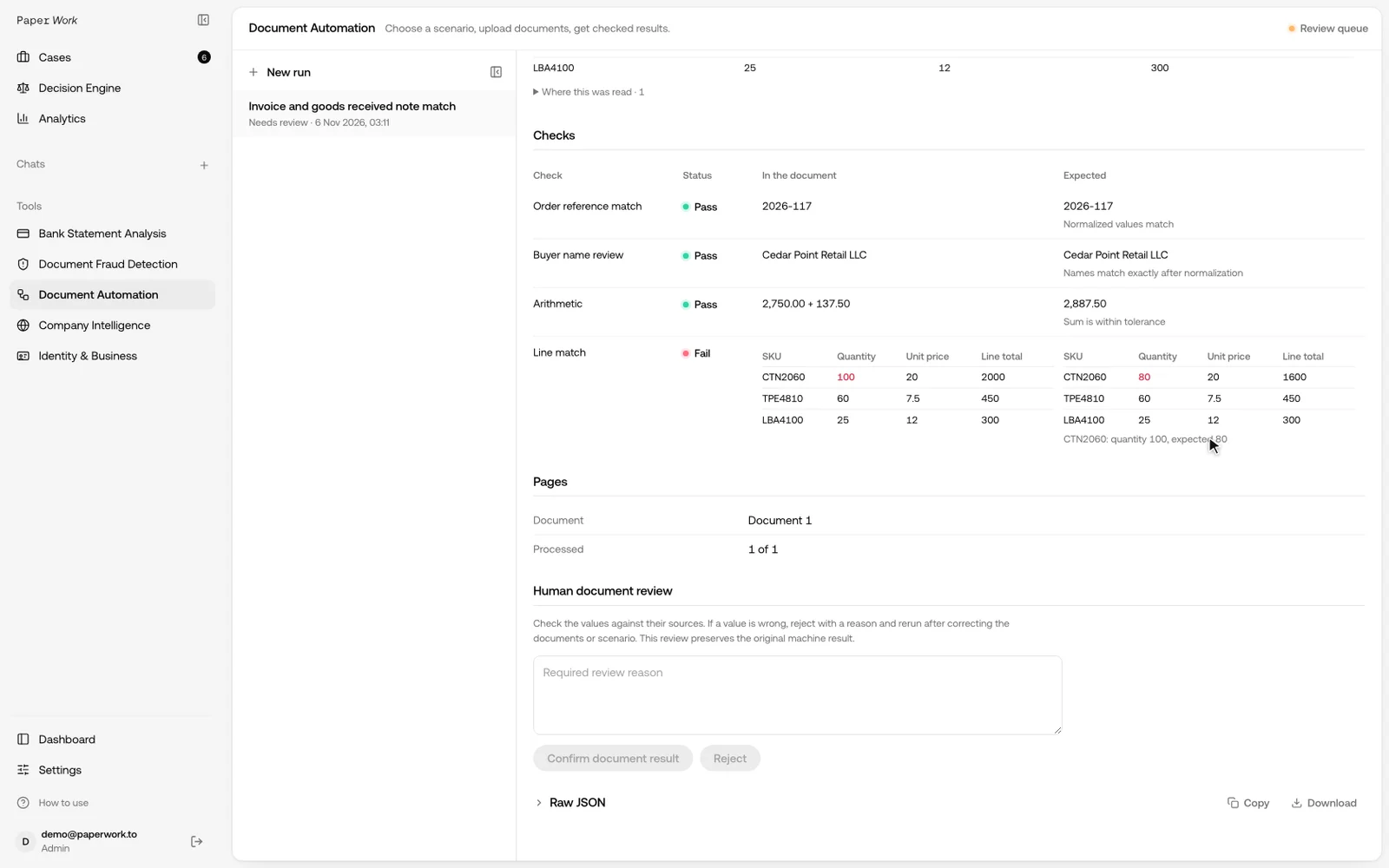
This is why a single “matched” label is insufficient unless the team knows what was checked. Two-way matching can pass for this order and invoice; a receiving comparison still finds a shortage. Keep the individual checks and their sources available for review.
Read extracted values before accepting the check
DA's sample result exposes the extracted invoice fields and their source locations. A reviewer can follow a value back to the page before deciding that a failed comparison is a genuine business discrepancy.
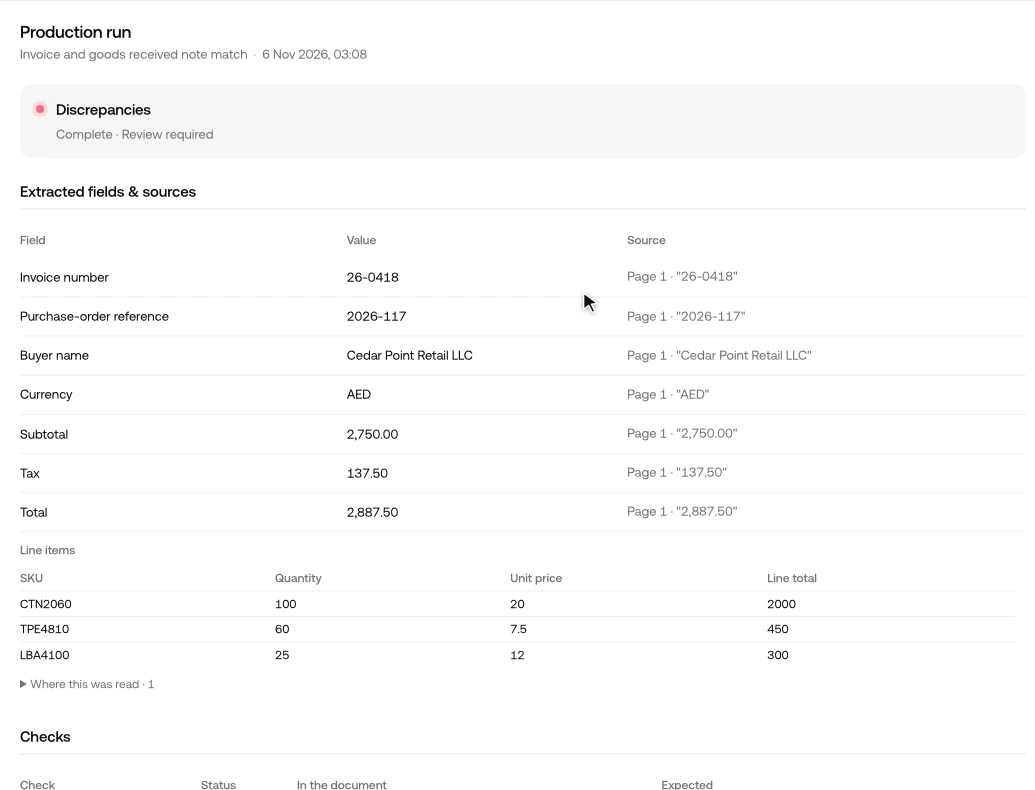
Work from the source outward. If the document says 80 but extraction reads 800, investigate the extraction. If both source and extraction say 80 but the invoice bills 100, investigate the commercial difference. Replacing a value merely to make a check pass would hide which of those problems occurred.
It is also useful to distinguish missing, zero and unreadable values. A missing unit price does not establish free goods. A blank order reference does not establish that a supplier intentionally avoided the order. Preserve the missing evidence and route it according to the agreed process.
Exceptions to agree before a pilot
Purchase-order matching becomes more useful when the team defines how recurring exceptions are handled:
| Exception | Rule the customer needs to agree |
|---|---|
| One order, several deliveries | Compare the relevant receipt or a controlled cumulative received quantity |
| One invoice, several POs | Allocate each billed line to the intended order and receipt |
| Repeated SKU | Decide which line or delivery the invoice refers to |
| Packs and individual units | Supply the conversion and preserve the original units |
| A changed price | Identify the approved revision or authorised variance |
| Freight or service lines | Define the evidence and comparison appropriate to that charge |
| Duplicate upload | Prevent another copy from becoming another receipt or bill |
These are implementation requirements, not a claim that every variant is covered by a default template. Start with representative files and independent expected results. Confirm that the chosen table check supports their actual columns, then add the missing logic for the agreed scope.
For a clean case, the expected result should explain why the records agree. For a shortage case, it should identify the item, both quantities and the missing receipt. For a damaged or incomplete file, it should retain the gap. Testing all three gives a more useful acceptance result than counting how many files finish processing.
What a configured DA process returns
DA can classify the files, extract the requested fields and compare documents or reference data using the configured checks. An invoice-to-PO template is an existing starting point. A broader receiving process needs its fields, keys and tolerances agreed and tested.
Useful results include the buyer, supplier and order references; extracted line values with available source locations; the comparisons performed; and the specific missing information or differences requiring review.
Define repeated item codes, partial receipts and unit conversion before launch. Matching on total amount alone can pair the wrong documents, while a single repeated SKU can represent several legitimate lines.
For UAE, Saudi, Qatari and Omani teams, start with the actual English or Arabic records and supplier codes. Confirm the layouts, expected checks and result before connecting the flow to your accounting process.
Discuss a purchase-order workflow with DA. If the concern is whether the file itself was altered, use Fraud Detection alongside the comparison.
Frequently asked questions
Is a purchase order an invoice?
No. The PO records the order; the invoice records the supplier's bill. They should be linked and compared where the process requires it.
Does a PO prove the goods were received?
No. The receiving record provides that part of the evidence. See the GRN guide for shortages and partial deliveries.
Can the workflow handle services?
Service purchases may use an amount, milestone or acceptance record rather than physical quantity. Define the applicable evidence and checks instead of applying a goods-receipt rule automatically.