A delivery note accompanies or describes a shipment and lists the goods being delivered. It helps the sender and recipient identify the shipment, its destination, the relevant order and the listed items.
It answers a different question from an invoice or a goods received note. The invoice requests payment. The GRN records the buyer's receipt. A delivery note can be linked to both, but the quantity printed by the sender should not silently become the buyer's accepted quantity.
This guide explains the document's practical role, the fields a receiving team needs and the comparisons that matter when procurement, receiving and finance share the records.
What should a delivery note contain?
Start with the identifiers needed to connect a shipment to its order and recipient. The exact format depends on the operation, but the comparison should be based on named fields rather than the visual position of a number.
| Field | What the team checks |
|---|---|
| Delivery-note number | A stable reference for this dispatch |
| Sender and recipient | The intended supplier, buyer and receiving location |
| PO or order reference | Which order the shipment belongs to |
| Dispatch or delivery date | The recorded stage and timing |
| Item identifiers | The agreed codes or descriptions |
| Quantity and units | What the sender lists, in cartons, packs or units |
| Receipt notes | Shortages, visible damage or other receiving observations |
| Acknowledgement reference | Who recorded receipt, when the process captures it |
A signature or stamp may be part of the business's evidence, but a document parser should not infer authority, physical inspection or signature authenticity from the mere presence of a mark.
Delivery note, purchase order, invoice and GRN
A purchase order records what the buyer ordered. The delivery note lists the shipment. The buyer's GRN records the receipt, and the invoice describes what is billed.
Sage's receiving documentation treats the receipt against an order as a separate recorded step. That distinction is useful even when a business calls its forms by different names: keep dispatch, receipt and billing evidence identifiable.
Documents may travel together or reuse the same identifiers. Their meaning comes from the business process, not from a rule that every file must have a different layout or number.
A shortage example
Suppose the order is for 100 cartons of CTN2060. The delivery note lists 100. The receiving team records 80, while the invoice bills 100 at AED 20 each.
The PO and delivery note agree, and the invoice matches their listed quantity. The receiving record still shows a shortage of 20 cartons. At the invoice unit price, AED 400 of billed quantity lacks a matching recorded receipt.
That discrepancy requires an explanation. The goods may arrive later, the receiving count may need correction or the terms may allow a different billing basis. It is not automatic proof that the supplier altered a document.
The team should retain the original delivery note, the receipt and the invoice, together with any later correction. Replacing the first receipt with a new total without a history makes the explanation harder to reconstruct.
Read delivery note 5531 with the receiving record
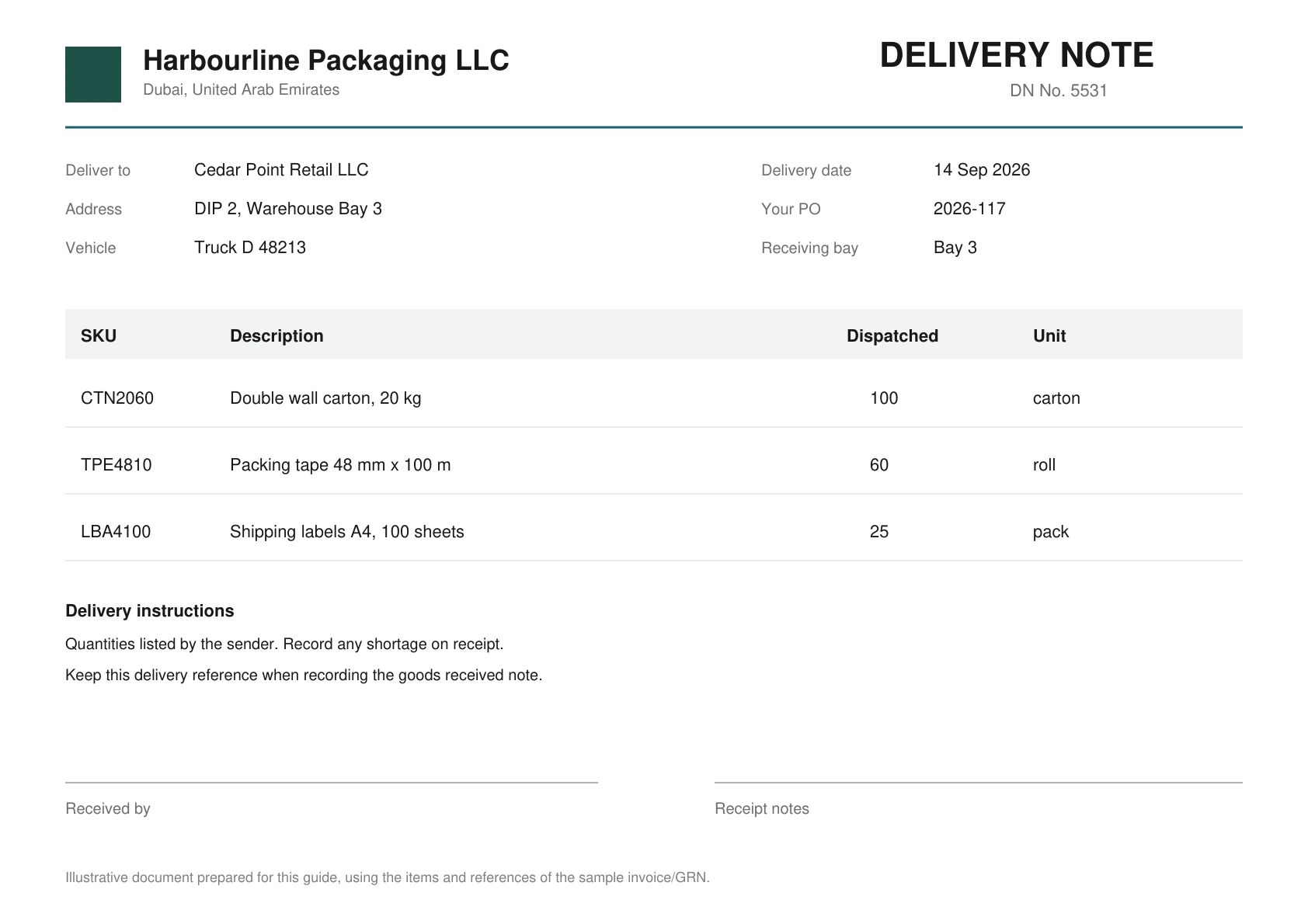
The sample note identifies Harbourline Packaging LLC as the sender and Cedar Point Retail LLC as the recipient. It references PO 2026-117, a delivery date of 14 September 2026 and the receiving location. The item table lists 100 cartons, 60 rolls of packing tape and 25 packs of shipping labels.
Start with those references, rather than jumping straight to the item total. A delivery for the wrong warehouse or PO can contain familiar products and quantities. The receiving team needs to know which order the record should fulfil before finance uses it as evidence.
The note then needs to be read alongside the buyer's GRN. In the existing sample GRN, the carton row shows 100 ordered and 80 received and accepted. The other two rows agree with their ordered quantities. The remarks explicitly identify a balance of 20 cartons not delivered.
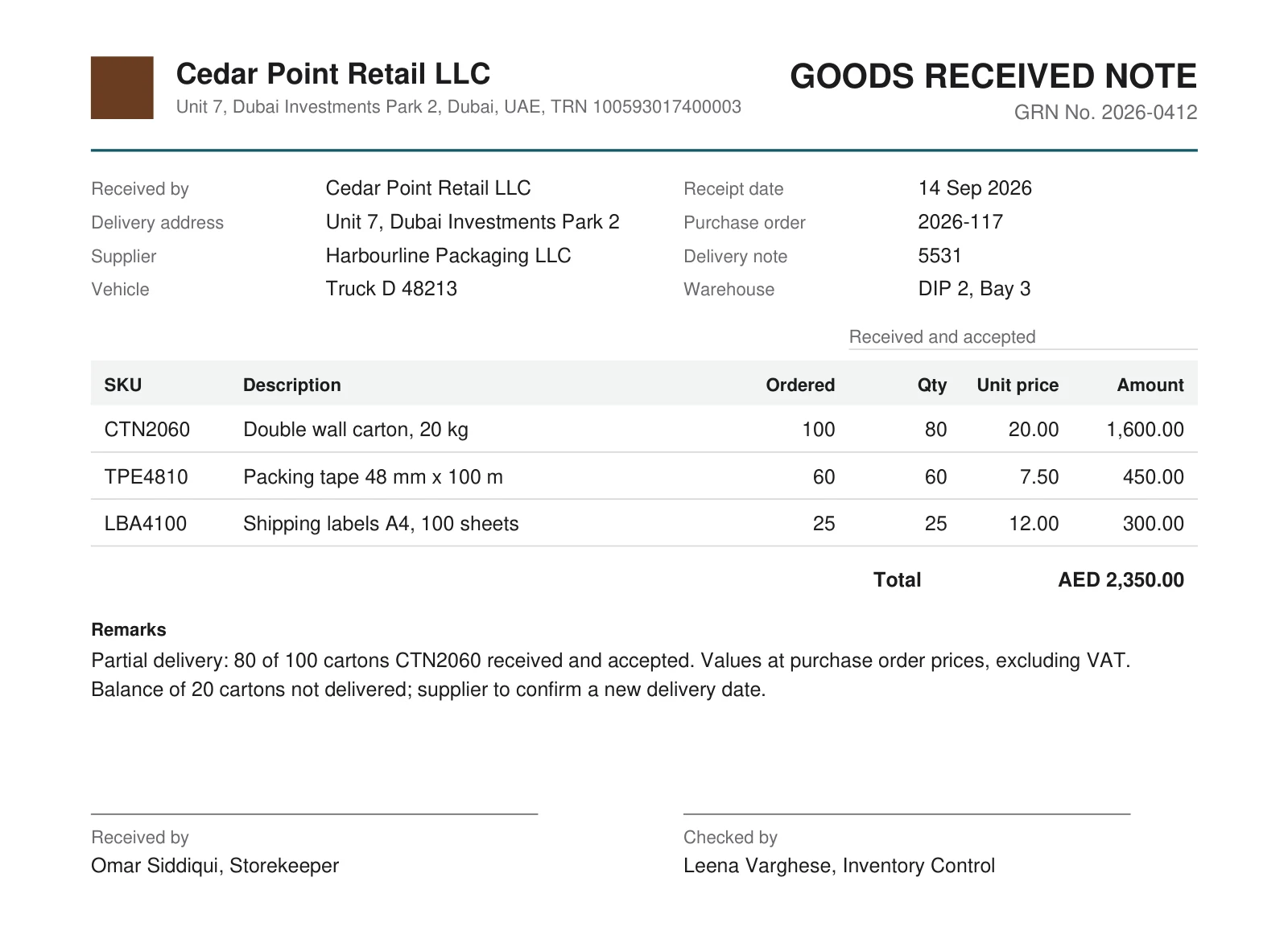
Read the two quantity labels literally. “Dispatched 100” is the sender's listing. “Received and accepted 80” is the buyer's recorded result. Treating them as interchangeable would erase the shortage before anyone reviewed it.
The GRN also values the received goods at purchase-order prices. That is useful for the example, but a delivery note does not need to become a priced invoice to be useful. A workflow should extract a price only where the relevant source contains it and the comparison needs it.
Partial deliveries and repeated item codes
One PO can be fulfilled in several shipments. Keep each delivery reference and the quantity recorded against it. A later delivery should reduce the outstanding quantity according to the agreed policy; a duplicate copy of the first document should not.
The same item code can appear on several lines or deliveries. Define whether a check compares a specific receipt, an accumulated order quantity or an individual invoice. Adding every row with the same code can accidentally count returned or rejected goods.
Units need equal care. Ten cartons and ten individual items are not comparable without the pack-size rule. If that rule is absent, the workflow should preserve the unresolved comparison for review.
Track a second delivery without counting the first twice
Assume the supplier later sends the remaining 20 cartons. The following continuation is an illustrative receiving log, separate from the recorded run:
| Record | Cartons recorded as received | Cumulative received | Still outstanding against 100 ordered |
|---|---|---|---|
| First receipt, linked to DN 5531 | 80 | 80 | 20 |
| Second receipt, with its own delivery reference | 20 | 100 | 0 |
| Another copy of the first receipt | No additional physical receipt | 100 | 0 |
The business has received 100, not 180. A copied PDF should not change the physical receipt history. The process needs an agreed way to recognise the record and associate it with the order and delivery; using only an item code cannot establish whether a document is another receipt or another copy.
The invoice history needs the same care. If the first bill already requests payment for all 100 cartons, the later receipt can complete its supporting evidence. A later invoice for another 20 cartons is a different commercial event and must not be assumed payable solely because a delivery took place.
Preserve both original records and subsequent corrections. If the first receiving count was wrong, record the correction and its reason. If the second delivery is genuine, keep its own date and reference. Both situations can produce a cumulative quantity of 100, but they describe different operational histories.
Distinguish received, accepted and returned quantities
A shortage is only one receiving exception. Consider an alternative to the sample: the team counts 80 cartons, but two are damaged and not accepted. That is not the same as receiving 78 cartons.
| Quantity concept | Alternative example | What the record tells finance |
|---|---|---|
| Ordered | 100 | Original procurement quantity |
| Physically received | 80 | Count at receipt |
| Accepted | 78 | Quantity accepted under the receiving process |
| Rejected or damaged | 2 | Needs its own follow-up and treatment |
| Not yet delivered | 20 | Remains outstanding unless the order is changed |
The applicable payment quantity depends on the customer's terms and acceptance process. Capture the distinct values first, then apply the agreed rule. Substituting one field called “quantity” for every concept would make a correct arithmetic check answer the wrong business question.
Returns need a linked record too. A later return of five accepted cartons changes the supported position. It should not silently edit the original delivery note or make the same goods available to support another invoice. Define whether the process uses accepted quantity, net receipts after returns or another agreed measure.
For service purchases, physical quantity may not be the right evidence at all. A completion certificate or milestone acceptance can play a different role. Keep that process separate from a goods-delivery rule rather than inventing a receiving count for a service.
Checking delivery records with Document Automation
A DA workflow can be configured to identify the files, extract order references and item tables, compare selected values and route differences. Define the documents and the expected result before selecting the checks.
The demonstration below checks an invoice against a GRN. It illustrates a recorded quantity difference; it is not a demonstration of delivery-note signature validation or physical receipt verification.
In a receiving workflow, useful checks include:
- the buyer, supplier and order references agree where required;
- the delivery is linked to the intended receiving location;
- item identifiers and units support the comparison;
- listed, received and invoiced quantities remain distinct;
- missing records and ambiguous lines follow the agreed review route.
The result should show the compared values and available source locations. A reviewer can then identify whether the issue is the order reference, the receipt or the bill, instead of receiving only a generic failure message.
Follow the discrepancy through the result
In the recorded invoice/GRN check, the order reference agrees and the invoice arithmetic passes. The row comparison still fails for CTN2060 because the bill has 100 cartons while the GRN has 80. The tape and label rows agree.
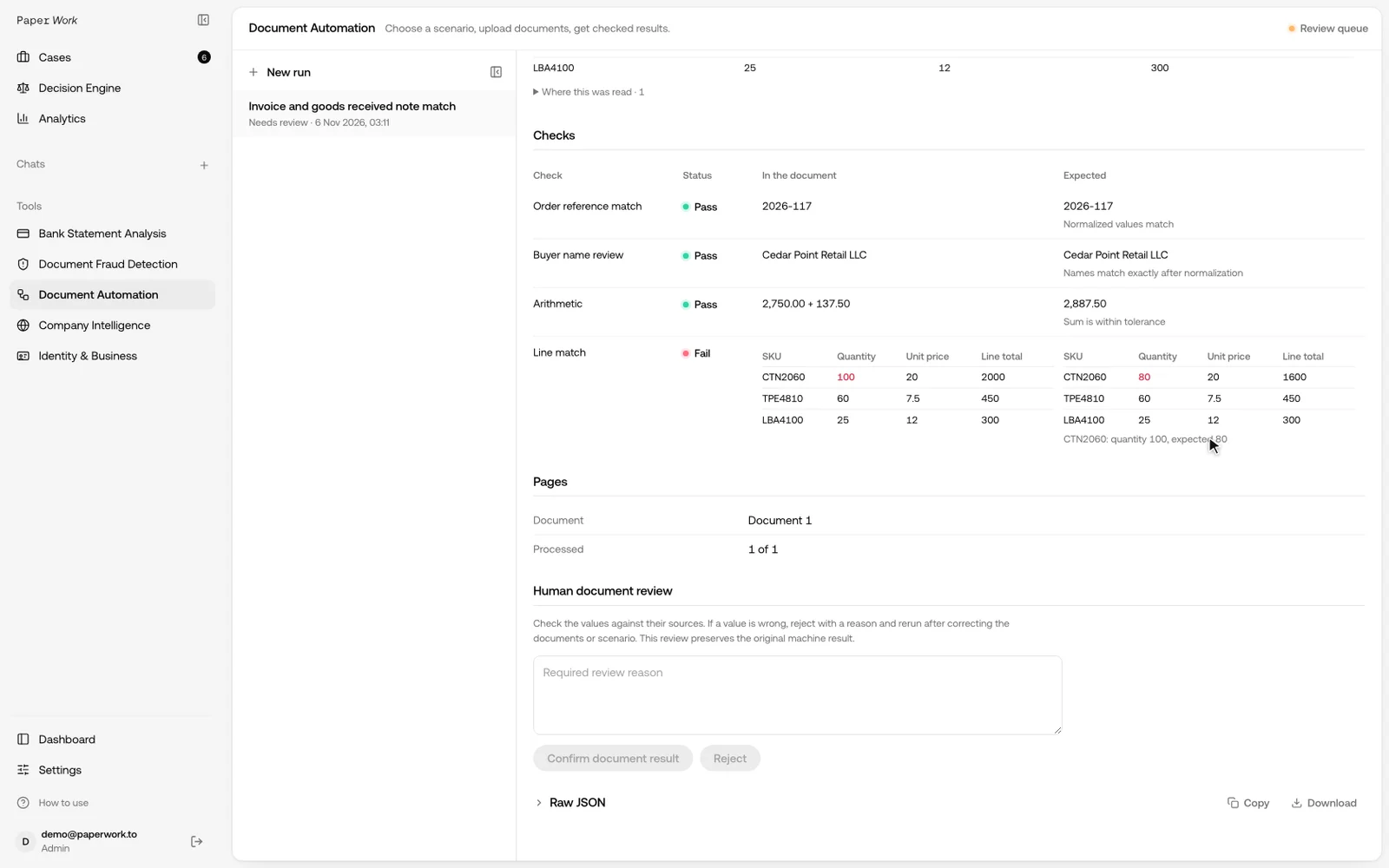
Use the difference to assign the next task. Receiving can confirm the physical count and record any later delivery. Procurement can confirm the approved order and amendments. Accounts payable can review the bill and the payment policy. The workflow's output should help each team identify the specific question it owns.
For example, a useful exception message identifies PO 2026-117, the relevant receipt and item CTN2060, the invoice quantity of 100 and the recorded receipt of 80. “Documents do not match” is much less actionable because it leaves the next reviewer to locate the affected record again.
When a value looks implausible, inspect its location on the source page. A product description may contain dimensions, weights and pack sizes as well as the transaction quantity. In the sample, 20 kg describes the carton specification; it is not the number of cartons received.
A practical handoff between receiving and finance
Before automating the document package, agree a small record of the handoff:
- Which order and delivery references must be present?
- Who records the received and accepted counts?
- Which document explains shortages, damage or returns?
- Which units and pack sizes are permitted?
- Who resolves an ambiguous comparison?
- What is returned to the accounting system, and which evidence can a reviewer open?
Test a complete delivery, the 100/80 shortage and a repeated copy of the receipt. Add a case with a missing reference or unreadable line. The desired outcomes should be prepared independently, so the team can distinguish a correct exception from a failed extraction.
The sample video shows an invoice checked against a GRN. A delivery-note flow uses the customer's own fields and receiving policy. Start with the records the team actually uses and confirm the checks on those layouts before expanding to other suppliers.
MENA document packages
For teams in the UAE, Saudi Arabia, Qatar and Oman, test the actual supplier forms and receiving records. Mixed English and Arabic descriptions, shortened names and supplier-specific item codes need representative examples.
Agree the operational meaning of a stamped delivery note and an internal receipt. Country-specific tax, transport or electronic-invoicing obligations require their own confirmed scope; this document comparison does not establish regulatory compliance.
Frequently asked questions
Does a delivery note need prices?
Its main purpose is to identify the shipment and listed goods. Some business formats include prices, while others do not. Compare price with the appropriate order or invoice record rather than treating an absent price as zero.
Is a delivery note proof of payment?
No. A shipment record and a payment record answer different questions. For payment matching, see bank reconciliation and invoice-to-payment matching.
Can the same form also record receipt?
Yes, depending on the process. Preserve which fields were supplied by the sender and which observations were added by the recipient. Confirm the meaning of any acknowledgement before using it as an acceptance rule.
How do we automate our checks?
Bring sample orders, delivery notes, receipts and invoices, plus the expected results. Discuss a configured DA workflow. For possible changes to the files themselves, add document-fraud checks.