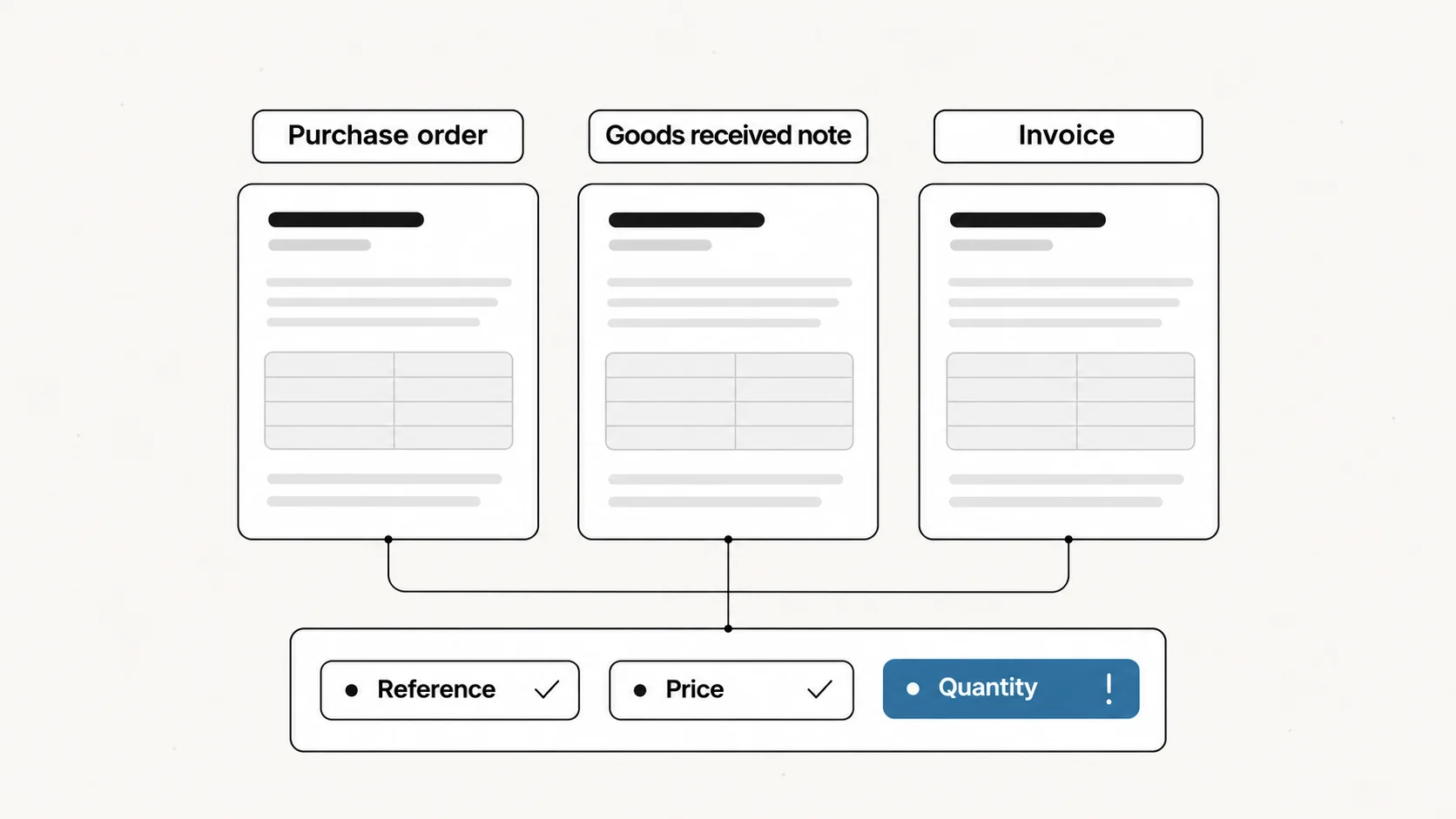
Three-way matching is an accounts payable control that compares a supplier invoice with the purchase order and the receiving record before the invoice is paid. Price is checked against the order. Quantity is checked against what was received. A difference beyond the agreed tolerance holds the invoice for review.
The same control is written 3-way matching or three-way match. This guide covers the process, the two-way and four-way variants, tolerances with worked numbers and the exceptions a team has to assign.
It does not repeat what each document contains. For that, see the guides to the purchase order, the goods received note and the delivery note.
What is three-way matching?
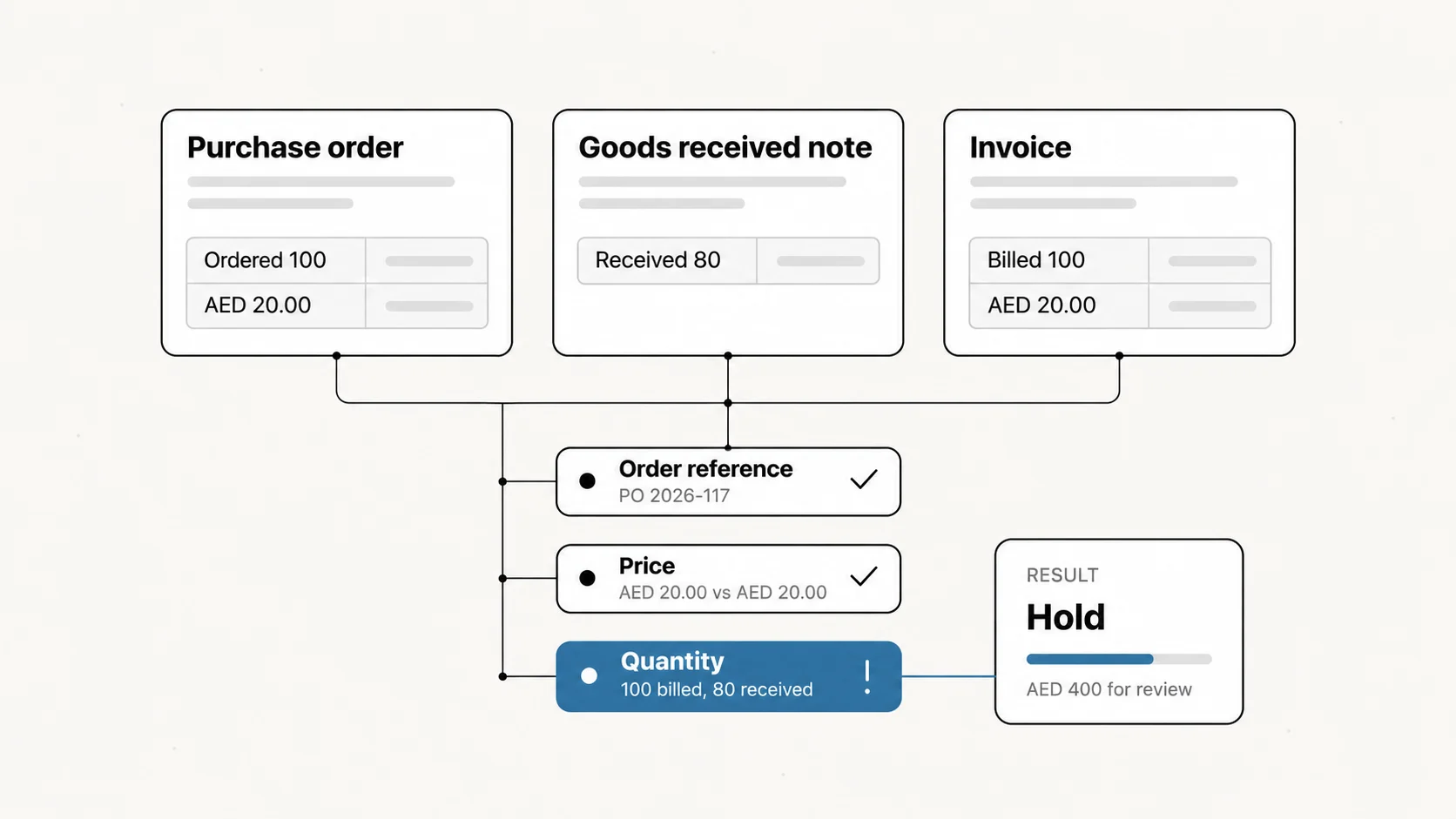
Three-way matching answers two questions with three documents: is the supplier charging the agreed price, and is it charging only for what arrived?
Microsoft's Dynamics 365 documentation defines it in those two parts: "Match the price information on the invoice to the price information on the purchase order. Also match the quantity information on the invoice to the quantity information on the product receipts that are selected for the invoice." Microsoft Learn: invoice matching.
Oracle's purchasing guide states the control as a payment condition: "Purchase order, receipt, and invoice quantities must match within tolerance before the corresponding invoice can be paid." Oracle Purchasing User's Guide.
Two-way, three-way and four-way matching
The level describes how many records an invoice has to agree with before payment.
| Level | Records compared | What Oracle requires to match | Often used for |
|---|---|---|---|
| Two-way | Order and invoice | Purchase order and invoice quantities | Services and purchases with no goods receipt |
| Three-way | Order, receipt and invoice | Purchase order, receipt and invoice quantities | Physical goods |
| Four-way | Order, receipt, inspection and invoice | Purchase order, receipt, accepted and invoice quantities | Goods that must pass inspection before acceptance |
The labels are shared across systems, while the exact comparison is a setting. Oracle's two-way level is stated in quantities. Microsoft's two-way matching compares the price on the invoice with the price on the order. Write down what your own check compares before relying on the name.
The three-way match process, step by step
1. Link the invoice to its order
Find the purchase order the invoice quotes. An invoice with no order reference cannot enter the match; it goes back to the supplier or to the person who requested the purchase. In the UAE the reference is often labelled as an LPO number.
2. Find the receipts for that order
One order can be delivered in several shipments. Select the receipt or receipts that the invoice covers. A second copy of the same receipt is not a second delivery.
3. Compare the price with the order
Read the unit price or the line amount on the invoice against the same line of the order. Use the approved revision of the order, since an older revision can make a correct invoice look wrong.
4. Compare the quantity with the receipt
Read the billed quantity against the quantity recorded as received. Where the process uses inspection, compare with the accepted quantity.
5. Apply the tolerance
Decide whether each difference is inside the limits the organisation has set. The next section works through the arithmetic.
6. Release, hold or return
An invoice inside tolerance continues to approval and payment. One outside it waits. Microsoft describes the choice for a price outside tolerance: the invoice can be saved "until it's approved for posting, or until you receive a correction from the vendor".
Tolerances: how much difference is acceptable
A tolerance is the difference a team accepts without review. It exists because rounding, small freight adjustments and pack sizes produce differences that are not worth an investigation each.
Tolerances are usually set in two forms. Microsoft's documentation says price totals matching "can be based on a percentage, an amount, or a percentage and amount", and that where both are set, a line has a discrepancy if either one is exceeded. The percentage can be configured for items, vendors or the whole legal entity.
The figures below are an illustration, with an assumed policy of 2% on unit price and AED 50 per line. They are not recommended values.
| Case | Order price | Invoice price | Quantity | Price difference | Line difference | Result |
|---|---|---|---|---|---|---|
| A | AED 20.00 | AED 20.30 | 100 | 1.5% | AED 30 | Inside both limits |
| B | AED 20.00 | AED 20.60 | 100 | 3.0% | AED 60 | Outside both limits |
| C | AED 20.00 | AED 20.30 | 1,000 | 1.5% | AED 300 | Percentage passes, amount limit fails |
Case C is the reason to set both. A percentage alone lets a small unit difference grow with the order size. An amount alone treats AED 30 on a small order the same as AED 30 on a large one.
Quantity has its own tolerance. Oracle describes a quantity received tolerance as "the maximum acceptable over-receipt Tolerance percent". With an assumed 5% on an order of 100, receiving can record up to 105 before the receipt needs approval.
A tolerance is a policy decision. It should be written down, owned by someone and reviewed, since a limit set too wide passes real overcharges without review.
Common exceptions and who resolves them
A failed match is a question addressed to a specific team. The result is more useful when it says which one.
| Exception | What the match shows | Usually resolved by |
|---|---|---|
| Billed above received quantity | Invoice 100, receipt 80 | Receiving confirms the count; the supplier delivers the balance or issues a credit |
| Price above the order | Invoice price outside tolerance | Procurement confirms whether a revision was approved |
| No receipt recorded | Invoice and order agree, receipt missing | Receiving records the delivery or confirms nothing arrived |
| No order reference | Invoice cannot be linked | Accounts payable returns it to the supplier or the requester |
| Received above ordered quantity | Receipt outside the over-receipt tolerance | Procurement accepts or returns the excess |
| Same invoice twice | Second invoice against an already matched receipt | Accounts payable |
| Units differ | Order in cartons, invoice in pieces | Procurement supplies the conversion |
The first row is worked through with documents in the goods received note guide: 20 cartons, AED 400 before VAT, with the possible explanations.
Record the reason when an exception is released. "Approved" tells the next reviewer nothing; "balance delivered on a second receipt" does.
When three-way matching is not the right check
Three-way matching assumes a physical receipt. Some purchases do not have one.
| Purchase | Why the receipt comparison does not fit | What is compared instead |
|---|---|---|
| Services | There is no goods count | The invoice with an acceptance record, a timesheet or a milestone |
| Advance payments | Money moves before delivery, against a proforma invoice | The tax invoice and the receipt, once they exist |
| Inspected goods | Goods can be received and then rejected | The accepted quantity, which is the four-way level |
| Low-value purchases | The review can cost more than the risk | The invoice with the order only, below an amount the organisation sets |
What a match result should record
A single "matched" or "failed" label is not enough for the person who has to act on it. A usable result records:
- the invoice, order and receipt references that were compared;
- each compared value and the document it was read from;
- the tolerance applied and whether it was exceeded;
- the specific line and difference behind a hold;
- who released an exception, and why.
A wrong extracted value and a correct value that disagrees need different follow-up. If the receipt says 80 and the system read 800, the problem is the reading. If both say 80 and the invoice bills 100, the problem is commercial.
Three-way matching with Document Automation
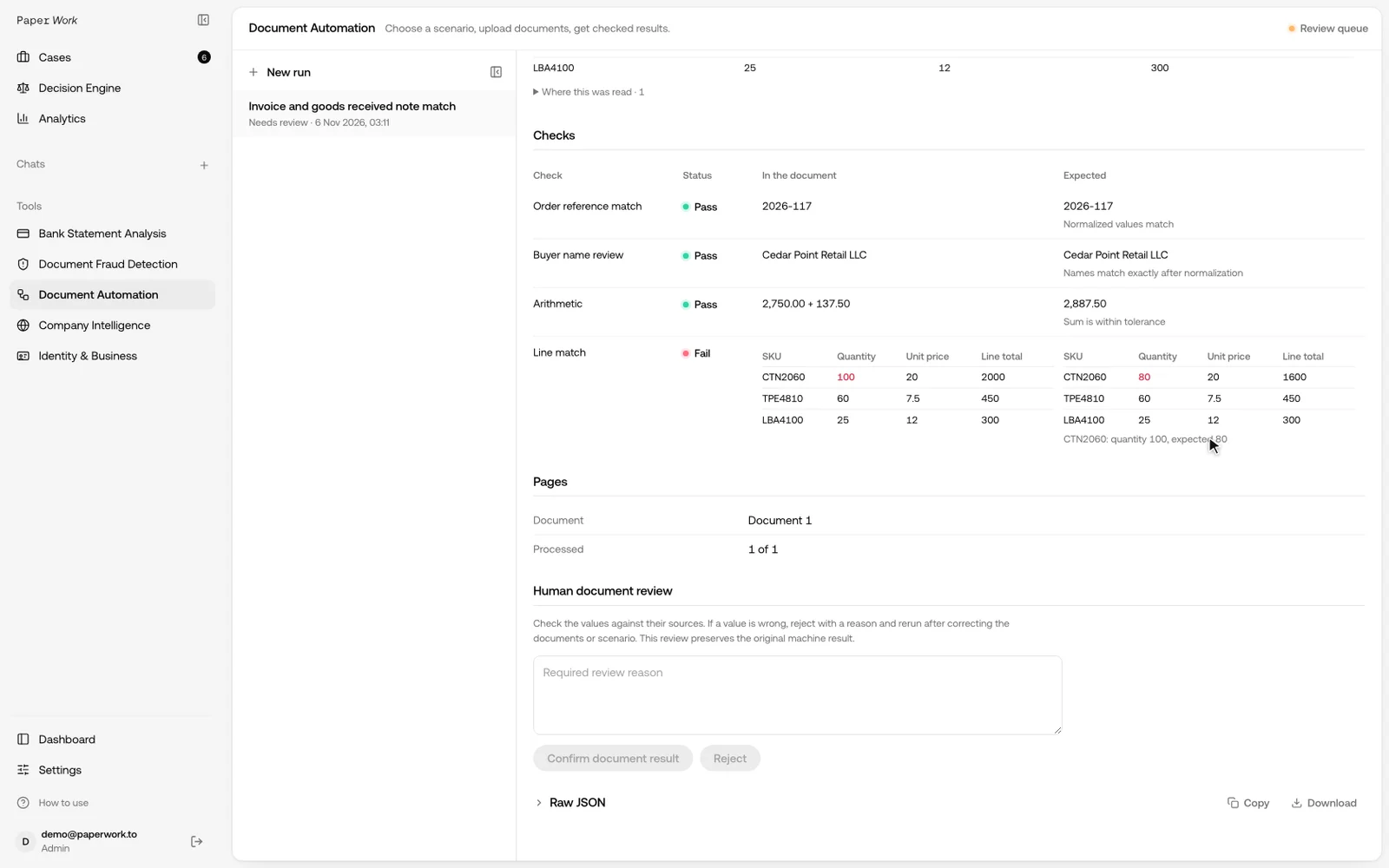
Document Automation identifies the uploaded documents, extracts their fields and line tables, applies the configured checks and returns a result a reviewer can open.
The recording above checks an invoice against a goods received note: order reference, buyer, invoice arithmetic, then line items by SKU and quantity. An invoice-and-PO template is already available. A full three-way scenario adds the customer's receiving rules and tolerances, which are agreed and tested against expected results before use.
A match shows that records agree. It does not show that a file is genuine. For edited PDFs or altered amounts, add Fraud Detection.
Discuss a three-way matching workflow with Document Automation.
Test cases to prepare before a pilot
Prepare the expected result for each case before running it, so a correct exception can be told apart from a failed reading.
- A clean package where all three records agree.
- A quantity shortage, such as 100 billed against 80 received.
- A price difference inside tolerance.
- A price difference outside tolerance.
- One order delivered on two receipts.
- The same invoice submitted twice.
- An invoice with no order reference.
- A line where the unit differs between the order and the invoice.
Frequently asked questions
What is the difference between two-way and three-way matching?
Two-way matching compares the invoice with the purchase order. Three-way matching adds the receiving record, so the invoice is also checked against what arrived.
Is 3-way matching the same as a three-way match?
Yes. Three-way matching, 3-way matching and three-way match are names for the same control.
Who performs three-way matching?
Accounts payable usually runs the match, using the order from procurement and the receipt from the receiving team. Where bookkeeping is outsourced, an accounting firm may run it on the client's documents. Exceptions go back to the team that owns the record in question.
Does a three-way match prove an invoice is genuine?
No. It shows that three records agree within tolerance. Whether a document was altered is a separate check.
What happens after the match?
A matched invoice goes to approval and payment. Matching the payment to the invoice in the bank statement is covered in the bank reconciliation guide.